
What Happens When You Type a URL in the Browser and Press Enter

If You’re An IT Expert, You’ll Most Likely Be Asked This Question At Least Once. At the same time, this question is a constant in employment interview questions for software and operating systems.
URL, it’s always good to have a basic understanding of what’s going on behind the scenes of web browsers and how to transfer information to computers over the Internet. In this paper, we will examine how this process is done.
Let’s assume you want to enter maps.google.com to find out exactly how long it takes to get from work to the restaurant’s dinner table.
1. Maps.google.com in the address bar of your browser.
2. The browser checks the cache for a DNS record to find the IP address associated with maps.google.com.
DNS (Domain Name System) is a database that maps website names to the specific IP addresses associated with them. Each URL on the Internet has a unique IP address. Here, the IP address refers to a computer that hosts the website’s server to which we request access. For example, www.google.com has an IP address of 209.85.227.104.
DNS maintains a list of URLs and IP addresses. This description serves the same function as a phonebook, listing names and phone numbers. So, if you wish, you can access www.google.com by typing http://209.85.227.104 in your browser.
DNS is designed to help us keep the names of addresses. You can easily access any website in your browser by typing the correct IP address, but imagine you need to memorize a different set of numbers for each site you visit regularly. As you might have guessed, it’s easier to remember the website’s name using the URL, which DNS matches the IP address with the site name, so that users can access the site without problems.
● First, check the browser cache. The browser maintains a repository of DNS records for a fixed timeframe for websites you’ve already visited. Therefore, it is the first place to run a DNS query.
Second, the browser checks the operating system’s cache. If there is no information in the browser’s cache, the browser will find the desired record in the active system cache. The operating system should not have a hidden supply that keeps DNS records.
● Third, check the router cache. If information is not required on your computer, the browser will communicate with a router that keeps a hidden cache of DNS records.
● Fourth, check the ISP cache. The ISP has its DNS server, which includes a set of DNS records. The browser tries to retrieve the URL from the DNS cache. If all steps fail, the browser will go to the ISP.
You might wonder why the cache is kept at different levels. When storing our data or other users’ data does not cause privacy issues, memory plays an essential role in regulating network traffic and improving data transfer times. They try to anonymize URL information and reduce network traffic as much as possible.
3. If the requested URL is not in the cache, the Internet Service Provider’s domain name system server will initiate a DNS search to find the IP address of the server that hosts maps.google.com.
As mentioned earlier, for my computer to connect to the server that hosts maps.google.com, I need the IP address for maps.google.com. The DNS query searches multiple DNS servers on the Internet until it finds the correct IP address of the website.
This type of search is called a recursive search, as the search repeatedly continues from a DNS server to a DNS server until it finds the IP address we need or shows an error response that it cannot find.
In these circumstances, we call the internet service provider’s domain name system server a DNS resolver, whose responsibility is to find the appropriate IP address for a domain name by asking other DNS servers on the Internet for answers.
Other DNS servers are called name servers because they perform DNS lookups based on the domain name architecture of the website.
Without further confusing you, I want to use the chart below to explain the domain architecture.
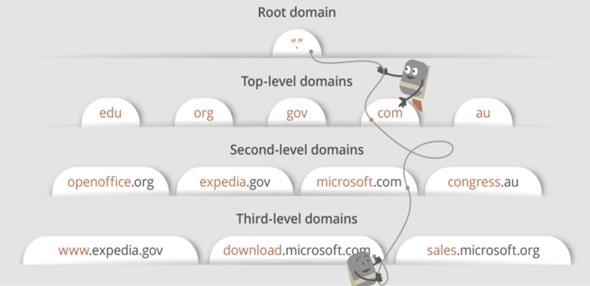
Many of the URLs we encounter today include a third-level domain, a second-level domain, and a top-level domain. Each level contains the server name used during the DNS search process.
To maps.google.com, a connection is first made to the root name server. The server redirects the root name of the request to the .com domain name server. The .com name server redirects this request to the Google.com name server. The server finds the expression google.com matching the IP address for maps.google.com in your DNS records, returns it to your DNS Recursor, and eventually returns it to your browser.
These requests are sent using small data packets that contain information such as the content of the request and the desired IP address (DNS returner IP address).
These packages are transmitted through network equipment between the user and the server before reaching the correct DNS server. The kit uses routing tables to figure out which way is the fastest to get, depending on the destination. If these packages are lost, the source will be notified by receiving an error message. If not a problem, the containers will reach the correct DNS server, take the valid IP address, and return to your browser.
4. The browser starts a TCP connection with the server
Once the browser has received the correct IP address, it will communicate with a server that matches the IP address to transfer information. Browsers use Internet protocols to create such communications. Various Internet protocols can be used, but TCP is the most common protocol for many HTTP requests.
Establishing a TCP connection to transfer data packets between the user’s computer and the server is essential. This connection is performed using a process called TCP/IP three-way handshake. It is a three-step process where the user and server exchange SYN (sync) and ACK (verification) messages to create a connection.
1. The client machine sends a SYN package to the server over the Internet and asks whether it is ready to receive new connections.
2. If the server has open ports to accept and set up new connections, it will respond with the SYN package verification message using the SYN/ACK package.
3. The client receives the SYN/ACK package from the server and confirms it by sending an ACK package.
Then, a TCP connection is established to transfer the data!
5. The browser sends an HTTP request to the web server
Once the TCP connection is established, data transfer begins! The browser sends a GET request to the maps.google.com web page. If you enter a credential or submit a form, this request can be a POST request.
The proposal also contains additional recommendations, such as browser identification (user-agent title), types of requests to be processed (reception headers), and TCP-based connection headers. It also sends information from cookies that the browser has stored for this domain.
You will see the GET request sample below.

If you’re curious about what’s happening behind the scenes, you can use tools like Firebug to check HTTP requests. Seeing the information sent between clients and servers attracts curious users, especially network experts.
6. The server handles the request and sends a response
The Request Controller is a program (written in ASP.NET, PHP, Ruby, etc.) that reads its request, headers, and cookies to check what is requested and update information on the server if needed.
The server includes a web server (e.g., Apache or IIS) that receives the browser’s request and forwards it to a request controller for processing and response. The controller then prepares a response in a specific format (e.g., JSON, XML, HTML).
7. The server sends an HTTP response
The server response includes the requested web page, the status code, the content-encoding type, the cache control, any cookies to set, privacy information, etc.
You can see a sample HTTP server response below.
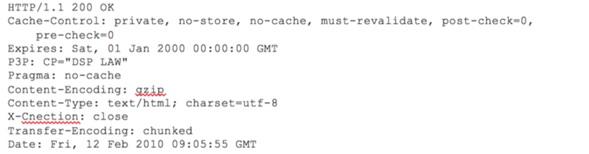
If you see the answer above, you’ll notice that the first line shows a status code. This is essential because the response situation shows us the fate of our request. Five types of problems are detailed using a numeric code.
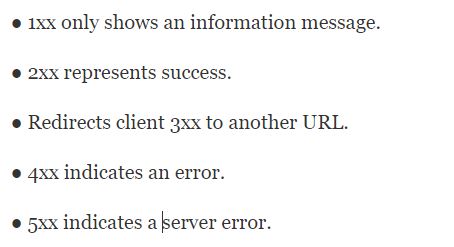
So, if you encounter an error, you can look at the HTTP response to see what type of status code you’ve received.
8. Browser displays HTML content
The browser displays HTML content in stages. First, it processes and shows the HTML skeleton. It then checks HTML tags and sends GET requests for additional elements on the webpage, such as images, CSS stylesheets, JavaScript files, etc. Finally, the contents of the maps.google.com address will appear entirely in your browser.
Although this seems like a tedious, long-term process, it only takes a few seconds to render a web page after pressing Enter. All of these steps happen in a few milliseconds before we find out.
I hope this article has helped you answer what happens when you type a URL in the browser and press Enter.
The browser checks for four caches to find the DNS record. Have you ever been asked this question in employment interviews? Please write about your experience in the comment section.
FAQ
What does the browser do first when I press Enter after typing a URL?
It contacts a DNS server to translate the domain name into the server’s IP address.
What happens after the IP address is found?
The browser establishes a TCP (or HTTPS) connection, sends an HTTP request, and awaits the response from the server.
How does the browser display the web page?
Once the server responds with HTML/CSS/JS (and other resources), the browser renders them to show the webpage.