
How to Reset Windows Password With Three Useful Tools: Practical Guide

Being Locked Out Of Windows 10 Because Of A Forgotten Password Can Be A Real Nightmare. How To Reset Windows Password With Three Useful Tools
Fortunately, we have several tools to reset Windows 10 passwords that can help you resolve this issue.
But you don’t want to go for unreliable software that makes the situation worse instead of solving it. Therefore, we have handpicked three tools to reset a Windows 10 password as effectively as possible.
Note that one of the items on this list is paid (with a free trial for a limited time), while the other two tools are completely free, so you can choose the option that works best for you.
The best Windows 10 Reset Windows Password tools
In the following, we present the best Windows 10 password reset tools to meet your needs.
PassFab 4 WinKey
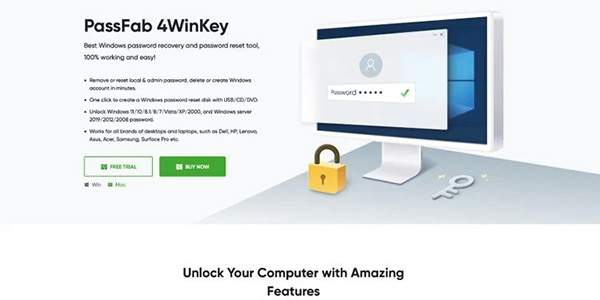
PassFab 4 WinKey software is an excellent tool for resetting your Windows 10 password. This software can reset or permanently delete native and administrator passwords, and it also allows you to quickly create or delete a Windows account. PassFab 4 WinKey is compatible with all desktop and laptop computers, and you can create a Windows password reset disk with a single click.
The main features:
- Compatibility with Windows and Mac operating systems
- Ability to quickly create a bootable USB, DVD, or recovery disk
- Ability to delete Windows 10 passwords for all user accounts
- Ability to reset forgotten passwords
- Ability to promptly delete or create new accounts in Windows 10
Advantages:
- Ease of use for both novice and professional users
- Creating a Windows 10 bootable reset disk with just one click
- Efficient support and advanced instructions for learning the processes within the software
- Reliable software for all users
Disadvantages:
- Features that depend on the version of your operating system
- The free trial of the software is only available through the PassFab 4 WinKey website
The main reason for PassFab 4 WinKey’s popularity is that it does the job more efficiently than similar tools. The support system and the tool’s instructions are virtually unrivaled, and some enhanced features are more attractive to professional users.
How to use PassFab 4 WinKey?
In the following, we will tell you how you will be able to reset your Windows 10 password and re-enter the operating system environment with the help of PassFab 4 WinKey:
1. Download PassFab 4 WinKey software from its official website.
2. After installing the software and opening it, select CD/DVD or USB Flash Drive and then connect the selected drive to the computer to start the boot disk creation process. Then click on the Next option.
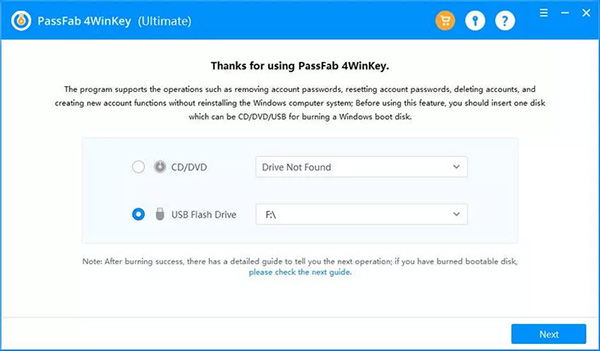
3. You will see a message saying that the contents of your drive will be erased. If you have no problem with this, click Next.
4. The boot disk creation process will finish, and you will be prompted to connect the drive to the locked computer.
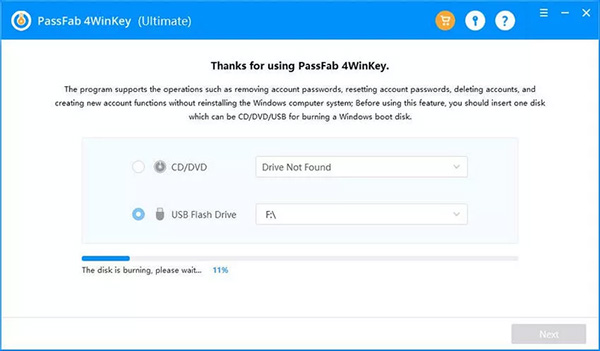
5. On a locked computer, enter the BIOS environment. Usually, to join this environment, you have to hold down a specific button when the desired system is booting up. To find this button, check the specifications of your desktop computer’s motherboard or the details of your laptop.
6. In the BIOS environment, look for an option called Boot Priority and select the Windows 10 recovery disk or USB you created in the previous steps.
7. Restart the locked computer and then select Reset Windows 10. Click Next. You will have four options: Remove Account Password, Remove Windows Account, Reset Account Password, or Create A New Account. Choose the option you like.
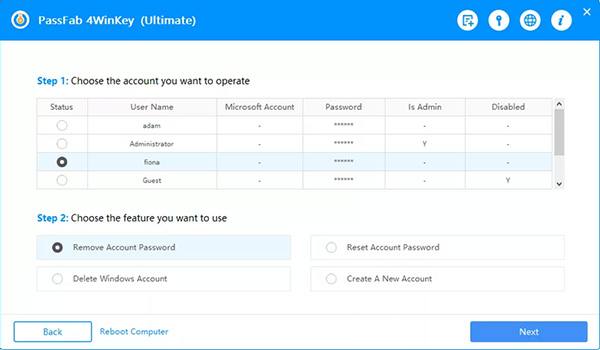
8. When finished, remove the recovery disc and restart the device. Your locked computer should now be unlocked.
Ophcrack
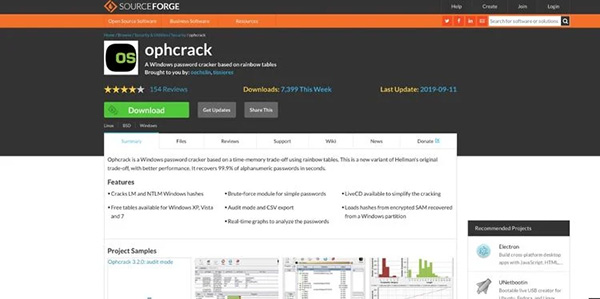
Ophcrack is a free password reset tool for Microsoft Windows, Linux, and Apple macOS. The best thing about Phcrack is that you don’t need to pay anything to use it. In addition, it is an excellent option for recovering shorter passwords.
The main features:
- Ultimately, open-source and free
- Compatible with Windows, Linux, and macOS operating systems
- Ability to analyze passwords in real-time
Advantages:
- It is free, but requires a little trial and error to get on board with the user interface
- Support for flash drives and disks
- Low volume
Disadvantages:
- Designed for professional users
Despite its misleading name, Ophcrack contains several features that help you recover lost Windows 10 passwords. In addition, Linux’s support prevents users from being left behind and provides features comparable to Windows or macOS. Unfortunately, this software contains many documents, and to use the tool effectively, you must read most of them thoroughly. Of course, when you understand the software’s functionality well, you will be surprised by its advanced capabilities.
Opcrack is triggered when passwords are fewer than 14 characters long. If your password is shorter than this value, Ophcrack may be able to recover it via brute force very quickly. However, if your password is longer than 14 characters, we recommend using PassFab 4 WinKey.
Microsoft’s official password reset tool
Microsoft’s official password reset tool is one of the best ways to resolve Windows 10 password issues. Naturally, this tool is an excellent option for recovering forgotten passwords. The only problem is that you must use it before getting stuck behind a locked device. We recommend referring to it whenever you change your password or install Windows on a new computer.
The main features:
- The possibility of recovering passwords using the official software of Microsoft
- After creating the disc, you can quickly reset the password with a few clicks.
- Benefit from official Microsoft support and instructions
Advantages:
- Ease of use and free
- No need to download any additional software
- A feature that is officially designed for Windows 10
Disadvantages:
- Before you get stuck behind a locked account, you should start using it
Finally, all the tools we introduced in this article will help you reset your Windows 10 password. As a summary of the article, PassFab 4WinKey, although a paid option, is considered the best tool for creating a bootable recovery disk and will meet your needs with a single click.
Ophcrack, on the other hand, works best with shorter passwords but doesn’t look great for passwords longer than 14 characters. Finally, it comes to the official Microsoft tool, which offers excellent performance but is also more troublesome.
FAQ
What methods can reset a Windows password?
Use built‑in utilities, password reset tools, or recovery options to regain access.
Is it safe to use third‑party reset tools?
Yes, reputable tools are safe when downloaded from trusted sources and used properly.
Can you reset a Windows password without reinstalling Windows?
Yes, these tools and methods allow password reset without reinstalling the operating system.