
What Is the Difference Between TCP and UDP Protocols — A Clear Comparison

You may have encountered TCP and UDP while setting up port forwarding on the router or configuring firewall software. But do you know what these two protocols are and what distinguishes them?
TCP and UDP are two protocols used for different types of data. Devices and computers connected to the Internet communicate with each other using the TCP/IP protocol. TCP / IP is a set of protocols used by devices to communicate over the Internet and most local area networks.
TCP / IP is derived from two main protocols: Transmission Control Protocol (TCP) and Internet Protocol (IP).
TCP provides applications with a way to deliver and receive packets sorted and reviewed over the network. Applications use the User Datagram Protocol (UDP) to provide faster data flow by eliminating error checking.
When configuring home Network hardware or software, you may need to know the difference between TCP and UDP. TCP and UDP protocols to understand the differences and what each is with Zvmyt. Stay tuned.
Features of TCP and UDP protocols
When a computer in New York wants to send data to a laptop in Tokyo, it must know the destination computer’s IP address. This information is often sent via UDP and TCP. TCP and UDP are protocols for sending data, or packets, over the Internet. Both protocols are IP-dependent.
In other words, it does not matter if you send a packet via TCP or UDP; in any case, the packet will be sent to an IP address.
TCP protocol
Using the Transmission Control Protocol (TCP), the data sender’s computer connects directly to the computer to which the data is being sent. It remains connected for as long as the transfer is in progress. This method allows these two computers to disconnect after ensuring the data entry is safe and correct.
This data transfer method is faster and more secure, but it puts more load on the computer because it has to control the connection and the data. For example, suppose you pick up the phone and call your friend. When both are done, you hang up and release the connection.
TCP tracks sent packets, so no data is lost or corrupted during transmission. This is why files downloaded will not be interrupted even if the Network is down.
However, if the receiver is completely offline, your computer will stop sending the packet, and you will see an error message saying it cannot communicate with the host. TCP achieves this in two ways:
- Order packages by numbering them
- Check for an error by having the recipient respond to the sender, confirming receipt of the message.
If the sender does not receive the correct response, the packets can be resent to ensure the recipient gets them correctly.
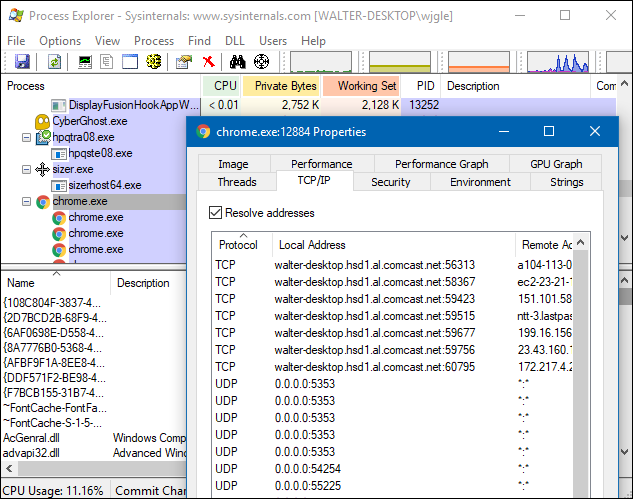
Process Explorer and other System processing tools can show the type of communication a process creates. The image below shows the Chrome browser with open TCP connections to all web servers.
UDP protocols
Using the User Datagram Protocol (UDP), the computer that sends the information breaks the data into small packets and sends them over the Network in the hope that they will reach their destination. This means that UDP, like TCP, does not connect directly to the receiving computer; instead, it sends the data across the network and relies on devices between the sender’s and receiver’s computers to deliver it to the intended destination.
This transfer method does not guarantee that the transmitted data will reach its destination. However, it has very little overhead, making it useful for services that do not care about the successful receipt and transmission of data on the first try.
An example is using older postal services: you put your letter in the mailbox and hope the postal service will get it to the right place.
This is done most of the time, but sometimes, it gets lost.
Data transfer using UDP is faster because the sender does not wait to confirm that the recipient has received the package, and continues sending subsequent packages.
If the receiver loses several UDP packets, they are lost, and the sender does not resend them. UDP is used when speed is the main criterion and error correction is not required. UDP is often used in live video broadcasts and online games.
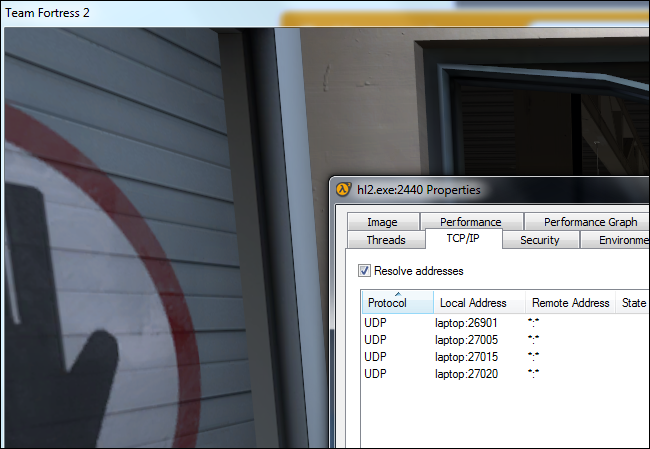
For example, suppose you are watching a live video stream over UDP. The server only sends a steady stream of UDP packets to the viewer computer, so when your connection is lost for a few seconds, the video may pause or skip, then resume from the current bit.
If you miss a portion of the package, the video or audio will be distorted momentarily, and the movie will continue playing without missing tracks.
This is what happens in online games. If you have some UDP packages while playing, the player appears to be teleported to the map. When you receive newer UDP packages, older packages requesting them back are useless because the game continues without you. All that matters is what is currently happening on the game server (not what happened a few seconds ago). Failure to correct the TCP error will slow down the game connection and increase latency.
TCP or UDP port
Every computer or device on the Internet is identified by a unique number called an IP address. This address identifies your computer among millions of others connected to the Internet. When information is sent over the Internet, your computer receives it via TCP or UDP ports.
You have one IP address with many ports, including 65535 TCP and 65535 UDP ports. When a program on your computer receives or sends information over the Internet, it sends the data to an IP address and a specific port on the destination computer. It gets on a random port on your computer.
The TCP protocol uses the TCP port to send and receive data, and the UDP protocol uses the UDP port to send and receive data.
The image below represents an IP address divided into several TCP and UDP ports. Note that no other program can use that port whenever it connects to a specific port.

Since this is a bit difficult to understand, we will give you a simple example: We use web servers. A web server is a computer running a program that allows other computers to connect to it and access web pages stored there.
A web server must connect the web server application to a local port to accept a remote computer connection request.
The web server then uses this port to listen and accept remote computer communication.
Web servers typically listen on TCP port 80, the same port that the HTTP protocol uses by default, and then wait for remote computers to connect. After a device is connected, it sends the requested web pages to the device remotely and disconnects when it is done.
On the other hand, if you are a remote user connecting to a web server, the opposite is true. Your web browser selects a random TCP port from a specific range and attempts to connect to port 80 on the web server’s IP address.
Once connected, the web browser sends a request to a specific web page and receives a response from the web server. After this, both computers will disconnect.
But how do you set up an FTP server (which allows you to transfer and download files from remote computers to the same web server)? FTP servers use TCP 20 and TCP 21 ports to send and receive information, so there will be no conflicts with the web server running on the TCP 80 port.
As a result, when the FTP server program is running, it listens on TCP ports 20 and 21 and waits for a connection to send and receive data.
Use of protocols
Applications use TCP or UDP depending on their needs and their developers’ decisions. Most programs require TCP error correction and stability, but some programs need to speed up and reduce UDP overhead. This should not affect your business much unless you are a Network administrator or software developer.
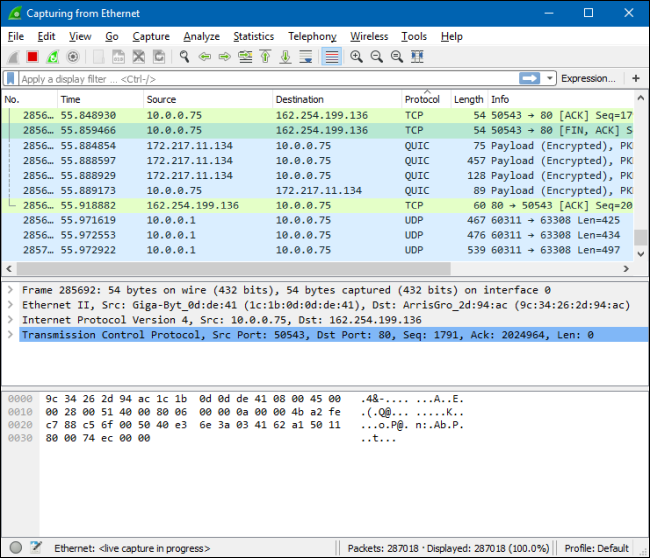
A network analysis tool such as Wireshark can help you see the different types of packets being transmitted.
If you have configured your router or firewall software and are unsure if an application uses TCP or UDP, you can select Both to have your router or firewall apply the same Rule to TCP and UDP traffic.
FAQ
What distinguishes TCP from UDP at a basic level?
TCP is connection-oriented — it establishes a connection and ensures reliable, ordered delivery. UDP is connectionless — it sends packets without setup, offering faster but less reliable communication.
When should I use TCP vs UDP?
Use TCP when data integrity and order matter (e.g. web browsing, file transfers, email). Use UDP for real-time or latency-sensitive tasks (e.g. live streaming, online gaming, VoIP) that can tolerate occasional data loss.
Why is UDP faster but less reliable than TCP?
Because UDP skips connection setup, acknowledgments, retransmission, and ordering — thus lower overhead and latency — while TCP includes error checking, sequencing, acknowledgments, and retransmission to guarantee delivery.