The first stage you should be aware of in web design is the control panel. The control panel is a System that helps you manage one or many hosts.
Undoubtedly, for those at the beginning of learning to build a website, understanding the types of existing control panels and their capabilities and advantages is essential. In this topic, we introduce one of the most popular and straightforward topics in the world.
What is Plesk?
After purchasing the host and domain, the next step in creating a website is to choose a suitable control panel for web management. Existing control panels, depending on the hosting, can be installed on Windows or Linux operating systems.
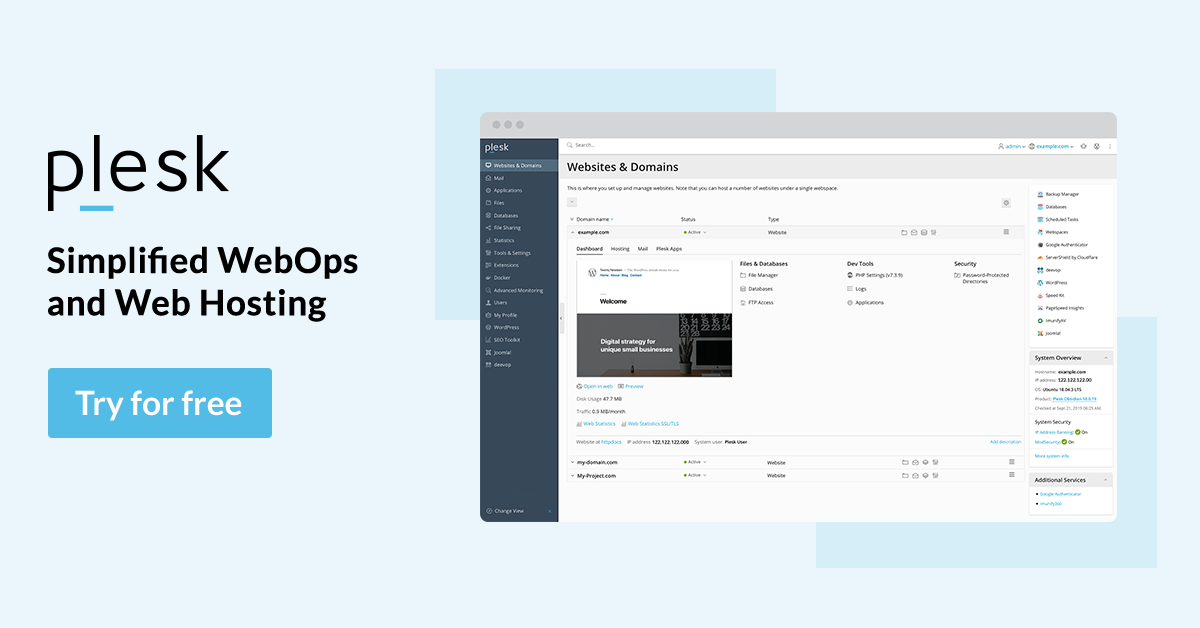
Plesk is a control panel that runs on both servers and operating systems. Support for both operating systems has drawn the attention of many web administrators to this control panel. Plesk features a simple user interface, making it accessible to users without specialized technical knowledge.
What is the usage of Plesk?
For proper management, what is a priority is its sustainability; A factor that is well observed in the Plesk control panel.
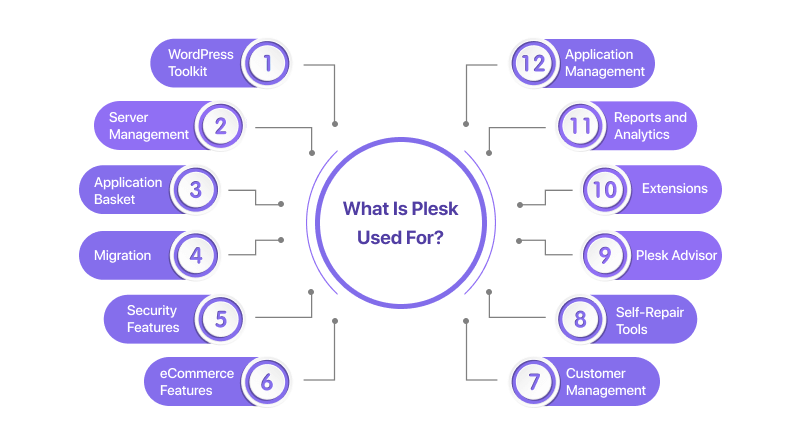
Server management can use this system to configure all reseller accounts, email, and DNS inputs through the web interface.
The simple user interface of the Plesk control panel makes it easy to install WordPress, Joomla, or other content management systems. Plesk hosting is updating its server constantly.
Therefore, compared to other competing control panels, it is offered in proportion to different versions of Windows and Linux. Fast installation, high speed, and the ability to adjust for different languages are some of the features that have made this system popular for many users.
Acquaintance with the Plesk control panel and how it works
As mentioned earlier, the Plesk control panel is compatible with both Linux and Windows operating systems. To open a website, you do not necessarily need programming knowledge or Coding proficiency.
By designing graphical interfaces, users with a lower level of knowledge can easily manage their sites. You do not need special training to be acquainted with the Plesk control panel. Everything you need to manage and configure the site is readily available to you.
Plesk plugins
One of the attractions of the Plesk control panel is its plugins. Plugins make it even easier for users and offer powerful features.
The set of plugins designed for Plesk is classified into three groups:
| Commercial extensions | Free extensions | Feature Pack |
|---|
| Cloudflare | DNSSEC Security Advisor Let’s Encrypt Git 1.0 Plesk Migrator Plesk events in Slack Ruby 1.2 Node.js 1.2 | Power Pack Hosting Pack Developer Pack Server Security Pack Email Security Pack 1 Email Security Pack2 Additional Language Pack MultiServer Docker Remote WordPress Toolkit |
Among the various plugins designed for the Plesk control panel, the following are the most valuable plugins:
Speed kit
To increase website speed. Of course, if your site takes more than 3 seconds to load, more than 57% of the audience will close the page.
Once installed, it analyzes all website sections and generates a System performance report for the administrator.
Kernelcare
For website Security. This plugin enables seamless server restarts without compromising System performance by installing patches and resolving bugs.
SEO toolkit
SEO toolkit for content management. Competitor analysis, visit monitoring, site accounting, and more can be done quickly with the help of this plugin. This plugin can help improve your website’s search engine ranking
WordPress ToolKit
to create a website. WordPress is the king of site building; everyone knows it. Over 42% of online stores use WordPress.
Acronis
for backup. Protect your server data with Plesk’s Acronis backup extension. Backup companies often utilize this plugin to back up all their customers quickly.
Kaspersky Antivirus for Servers
for email. This plugin scans all incoming and outgoing emails, removing harmful code. Use this antivirus to protect your mail servers from threats.
Git
for integration. Git is a popular version control System known for its high speed, integration, and ability to distribute data non-linearly. More than 70% of web developers use this plugin as the primary resource management method.
Security in the Plesk control panel
Security is a significant factor that influences the design of all control panels. Due to the high skill of hackers and the increasing frequency of cyber attacks, users require a secure and highly protected environment. Plesk, as a hosting platform, has a high level of Security.
Several firewalls and tools, such as Revision Antivirus, Fail2ban, and anti-spam emails, protect Plesk from hackers.
Advantages of using Plesk
The statistics recorded to date show the high popularity of the Plesk control panel. Among the reasons that have gained users’ satisfaction, the following can be mentioned:
- High-security System
- High speed
- Support for PHP and ASP.NET programming languages
- Support for MSSQL & MySQL databases
- Compatibility with Kaspersky antivirus
- Web optimization management
- Domain and subdomain management
- easy and fast installation of different cms
- Free trial: Unlike other control panels, Plesk allows users to test it for free before purchasing and using it.
Accessible resources: Plesk requires minimal resources to work. From now on, this System will be very light and compact.
The preferred choice for Windows: Most Windows server users prefer the Plesk control panel.
Disadvantages of using Plesk
Despite all its features, the Plesk control panel needs to be upgraded in some areas, which some users refer to as shortcomings of the System.
Security Concerns: Although the Plesk control panel has taken significant measures to address Security vulnerabilities, there is a history of ongoing security concerns.
Data backup and recovery: The Plesk control panel outperforms competitors in many areas, but it needs improvement in data recovery.
Backing up and restoring require significant free space, especially when transferring large files to another server.
Complexity: Although it has a simple user interface, installing scripts is more challenging than with cPanel; therefore, Beginners Need to become more accustomed to the space.
Why do we use Plesk
To clarify the answer to this question, it is better to get acquainted with the main features and capabilities that this powerful control panel provides you:
- FTP (File Transfer Protocol)
- File management (Includes setting access, deleting or adding new folders, uploading files, and creating virtual directories)
- Mailbox management (Delete or add a mailbox, change password, send mailbox to another mailbox, create auto-reply status, set mailbox space, and activate Anti-spam and antivirus)
- Default website page management
- Website backup management
- Database management, including (deleting or adding a database, adding or deleting a user, changing a password)
- Use the database online without using Query Analyzer or Enterprise Manager.
What are the features of the new version of Plesk?
The latest version released by Plesk is Plesk Obsidian, which was made available to users in 2019.
The features that this version provides to its audience include the following :
Plesk has been one of the best web management servers since 2006. Plesk’s old and powerful competitor is the cPanel control panel, which is compared from different angles.
Each control panel has unique features, and customers must choose the most appropriate option based on their needs and the type of operating System they use. Users seeking an accessible and excellent graphical user interface can utilize the Plesk control panel at a lower cost.
FAQ
What is Plesk used for?
Plesk is a web hosting control panel that centralizes and automates server and website management tasks, enabling easy administration of domains, email, databases, and more.
Which operating systems does Plesk support?
Plesk supports both Linux and Windows servers, making it flexible for different hosting environments.
Why do hosting providers choose Plesk?
Hosting providers use Plesk for its user-friendly interface, automation features, scalability, and extensive plugin ecosystem that streamlines hosting operations.