
What Are the Components of a Database System — Key Building Blocks Explained

A database system is a set of components from various database software, including database applications, client components, database server(s), and the database itself.
In this article, we briefly review each of these components.
Database application
A database application is a special-purpose software designed and implemented by users or third-party companies.
Client component
In contrast, client components are all-purpose database software designed and implemented by the database company. Client components allow users to access data stored on a local or remote computer.
Database server
The job of the database server is to manage the data stored in a database. Each client interacts with the database server by sending a request. The server processes each dialog and sends the result to the client.
Database System
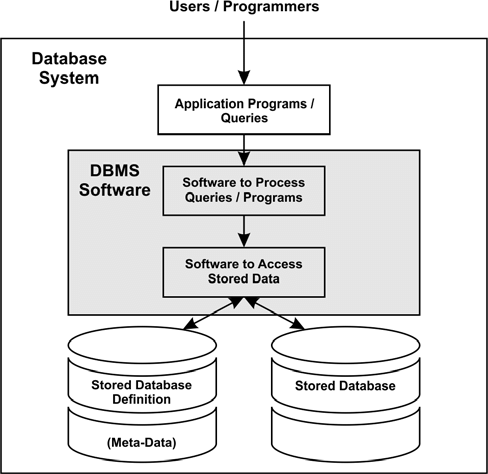
Generally, a database can be examined from user and system perspectives. From a user perspective, a database is a collection of data logically related to each other. From a systems perspective, a database is a collection of bytes stored on a disk. Although these two views of a database are entirely different, they also have commonalities.
The database system must provide interfaces that enable users to create databases and retrieve or modify data, as well as system components for managing stored data.
Therefore, a database system must provide the following features:
- Different types of user interfaces
- Physical independence of data
- Logical data independence
- Questionnaire optimization
- Data integrity
- Simultaneous control
- Backup and restore
- Database Security
The description of each of these components is as follows:
Different user interfaces
Most databases are designed to be usable by users with different levels of knowledge. For this reason, a database system must provide a wide range of functionalities and sometimes separate them into user interfaces.
The user interface can be graphical or textual. Graphical User Interfaces (GUIs) accept user input via keyboard or mouse and provide graphical output on the monitor.
The most common text user interface in database systems is the command-line interface, where the user enters commands at the keyboard, and the system displays output textually on the screen.
Physical independence of data
Physical data independence means that database applications do not depend on the physical structure of the data stored in a database. This critical feature enables you to modify stored data without changing database applications.
For example, if the stored data has already been sorted using a particular criterion and that sorting is later modified using another criterion, physical data modifications should not affect the performance of existing database applications or database layouts.
Logical data independence
In the file processing process (using traditional programming languages), a file is defined in applications, so any change to its structure usually requires modifying all programs that use it.
Database systems provide logical data independence; in other words, changes to the database’s logical structure can be made without modifying the database applications.
For example, if the database system has a physical structure called PERSON and you want to add an attribute to it, you only need to modify the database’s logical structure; there is no need to edit existing programs.
(Of course, the program must be modified to use the new column added.)
Questionnaire optimization
Most database systems include a subset of optimizations that cover a variety of possible implementation strategies for data interaction queries. The most efficient method is then selected.
The strategy chosen is called the query execution program. The optimizer makes its decisions based on factors such as the sizes of the tables involved in the query, the criteria, and the type of logical operator (AND, OR, or NOT) in the WHERE clause.
Data integrity
One of the tasks of a database system is to identify incompatible logical data and reject its storage. (A clear example of this is February 30, or 5:77:00 p.m., two examples of conflicting data.) In addition, most real-world problems implemented by database systems have integration constraints.
Implement properly. (An example of an integration constraint might be an employee’s organizational number, which should be five digits.)
The data integration task can be done in a database application or database management system (DBMS). In most cases, however, the DBMS must perform this task.
Synchronous Control
A database system is a multi-user software, meaning many applications can access a database simultaneously. Therefore, every database system must have some control mechanism to ensure that several programs that try to update the same data do so in a controlled manner.
The following is an example of a problem that may arise if a database system does not include such control mechanisms:
- Bank account holders 4711 have $ 2000 balance in Bank X.
- The two joint owners of this bank account, Ms. A and Mr. B, refer to two different bank tellers, each of whom withdraws $ 1,000 at the same time.
- After completing this transaction, the amount in bank account 4711 should be $0, not $1000. As above, all database systems have the necessary mechanisms to handle these scenarios.
Backup and restore
A database system must have a subsystem responsible for recovering hardware or software errors. For example, suppose a crash occurs while a database application updates 100 rows in a table. In that case, the recovery subsystem must roll back all executed updates to ensure the relevant data remains compatible after the error occurs.
Database Security
Authentication and permissions are the most essential concepts associated with a database. Authentication is the process of verifying user identity to prevent unauthorized use of the system. Authentication usually requires the user to enter a username and password.
The system evaluates this information to determine whether the user can access the system. Cryptography can improve this process.
Licensing occurs after a user has been authenticated. The system determines what resources a particular user can use during this process.
In other words, access to specific information is limited to important people, such as top executives, and other users are not allowed access to sensitive information.
FAQ
What are the core components of a database system?
A database system typically comprises Hardware, Software (the DBMS), Data, Procedures, Database Access Language, and Users.
What does the “software” component include?
The software component includes the DBMS itself, the storage engine, the query processor, and utilities that facilitate data management, access, and administration.
Why are “procedures” and “users” considered components?
“Procedures” define the rules and methods by which the database is used — e.g. how data is entered, backed up, and secured. “Users” include applications, administrators, and end-users who interact with the database system under defined permissions.