
Has Your Wi-Fi Been Hacked

If you are using ADSL Internet, you have noticed a sudden decrease in your account usage, and you may even suspect your service provider. But does the server system consume volume, or has your Wi-Fi been hacked?
As a long-time ADSL subscriber, you probably didn’t experience throttling problems in the early years. Your system was typically connected to the modem via a cable, and your data transmission was fully controlled.
However, the problem arose when, as wireless smartphones developed, ADSL modems enabled data sharing via Wi-Fi. But is it insecure to connect your mobile phones wirelessly to the modem via Wi-Fi?
Wi-Fi has also thought about security, but…
When the Wi-Fi standard was developed, measures were needed to secure it, given the nature of sharing an unlicensed frequency band among all users.
Various encryption and security systems, such as WPSK and WPSK2, were developed from this.
These systems create a secure connection between your device and the modem through complex encryption. As a result, your data cannot be recovered or viewed in the correct format if it is intercepted by a third party en route.

But how can your Wi-Fi be hacked despite these security standards?
The first step is to ensure consumption.
All ADSL internet service providers have provided you with a user panel to check your current service status and information such as remaining volume, remaining time, service speed, purchasing recharges, etc. One service you can access through your user panel is micro-consumption viewing.
First, compare the date and time, and the volume of consumption for that period, with your consumption in that period by checking the micro-consumption section. If you haven’t used the internet modem on that date and time, or if you notice consumption much higher than your average, check your modem.
How can we determine whether someone is using our modem?

The first step in checking whether your modem has been hacked is to disconnect the modem. Modem hacking is the connection that is out of your control. A relationship in which the user compromises your Wi-Fi password and connects to your modem. How do we determine who is connected to our modem?
The modem settings page, accessible at 192.168.1.1, includes a section that displays the devices connected to it. In this section, you can check for the presence of unauthorized devices by viewing their number and physical address (MAC).
However, it may be challenging to access the modem settings page to check this issue within a few time frames; you can use the provided software instead.
FING is a simple and easy software to view connected devices
The Fing software, available on Android and iOS, is compact and straightforward. By downloading and installing it on your mobile phone, you can instantly see the number of connected devices and their names and IP addresses. This software can be downloaded from the Google Play Store and Bazaar for Android, and from the iTunes Store for iOS.
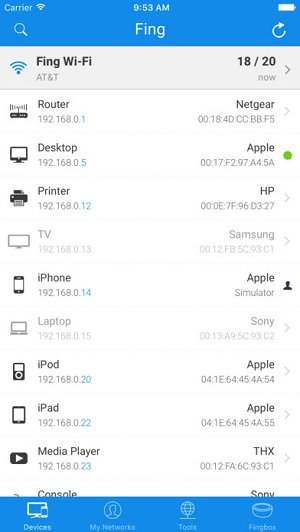
For example, in the picture above, you can see that a system of Apple desktops, an HP printer, a TV, an iPhone, etc., is connected to your modem (Netgear).
What should we do if we notice an additional, unauthorized device?
After diagnosis, it is time for treatment.
You will indeed hack the Wi-Fi password and connect an unauthorized device to your modem at this stage. You can remove only the symptoms of the problem, like some medicines; that is, you can change the Wi-Fi password or not allow access to that device through the modem settings.
However, the better solution is to identify how to address and close the loophole. The best and easiest way to hack a modem is to use Androdumpper software. After determining your modem’s name, this software attempts to crack its password. But what kind of breach does this software use to infiltrate?
You will notice an interesting thing if you have worked with this software. This software can only crack the password of modems whose WPS is enabled. Therefore, disabling the WPS function in the modem settings page is the most effective and easiest way to prevent this intrusion.
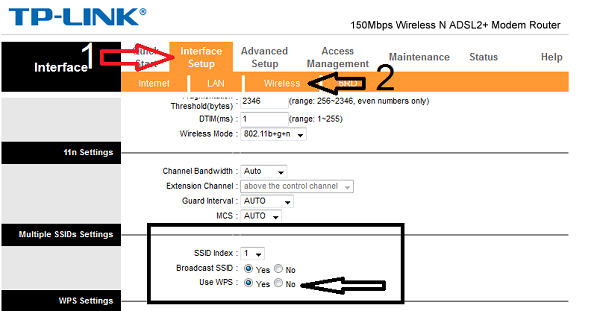
With this, the easy, standard hacking method will be closed off. But are you sure that your device will not be hacked again?
Never be sure about security.
There is no way to ensure the modem is safe or unhackable, as new loopholes may be discovered at any time. Therefore, the best way to ensure the modem is not compromised is to periodically check the devices connected to it. By doing this, you can ensure that there are no unauthorized devices.

The safest recommended method is to use the MAC FILTERING function.
If you still notice a connection from a non-virtual device after disabling WPS, or if you are concerned about your modem being hacked, use it as safely as possible. Using this method, you give your modem the MAC addresses that are allowed to connect.
By doing this, the modem will only allow authorized devices to connect. Since the MAC address is unique to each device, this method provides a high degree of assurance of an authorized connection to your modem.
However, the issue with connecting a new device (such as a guest) is that you must enter the modem settings page and add your device’s physical address to the allowed addresses each time.
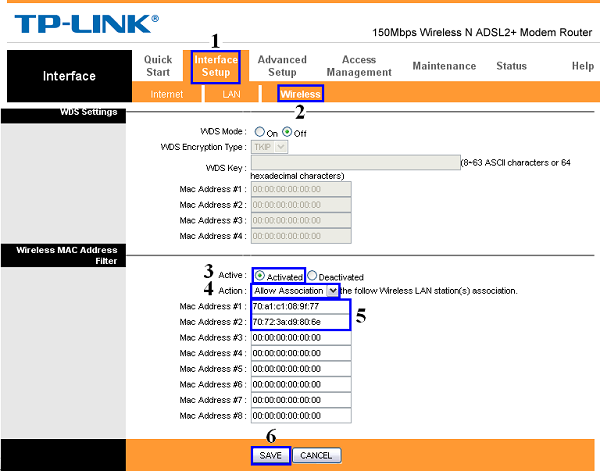
No matter how secure you think MAC FILTERING is, you cannot be certain your modem is unhackable, given the state of the security landscape. However, with the suggested methods, you can essentially ensure this, as higher levels of expertise are not typically used in this field to hack your modem in this situation.
FAQ
What are common signs your Wi‑Fi may be hacked?
Unusual network activity, slow speeds, unknown devices connected, or unexpected password changes can indicate a breach.
How might attackers access your Wi‑Fi?
They may exploit weak passwords, outdated encryption, or poorly secured routers to gain access.
What should you do if your Wi‑Fi is compromised?
Change your Wi‑Fi password, update router firmware, and enable strong encryption like WPA3 or WPA2.