
Microsoft Adds Built‑In Screen Recording to Windows 11 via Snipping Tool

Microsoft Will Soon Add The Screen Recording Feature To Windows 11’s Snipping Tool. Apple’s macOS Has Had Such A Feature For A Long Time.
After many requests, Microsoft finally said it would add a dedicated screen recording tool to Windows 11. Windows Snipping Tool will soon host a screen recording feature, so Windows users don’t have to use the Xbox Game Bar or other means to capture screen content.
Microsoft Adds Screen Recording Tool To Windows 11
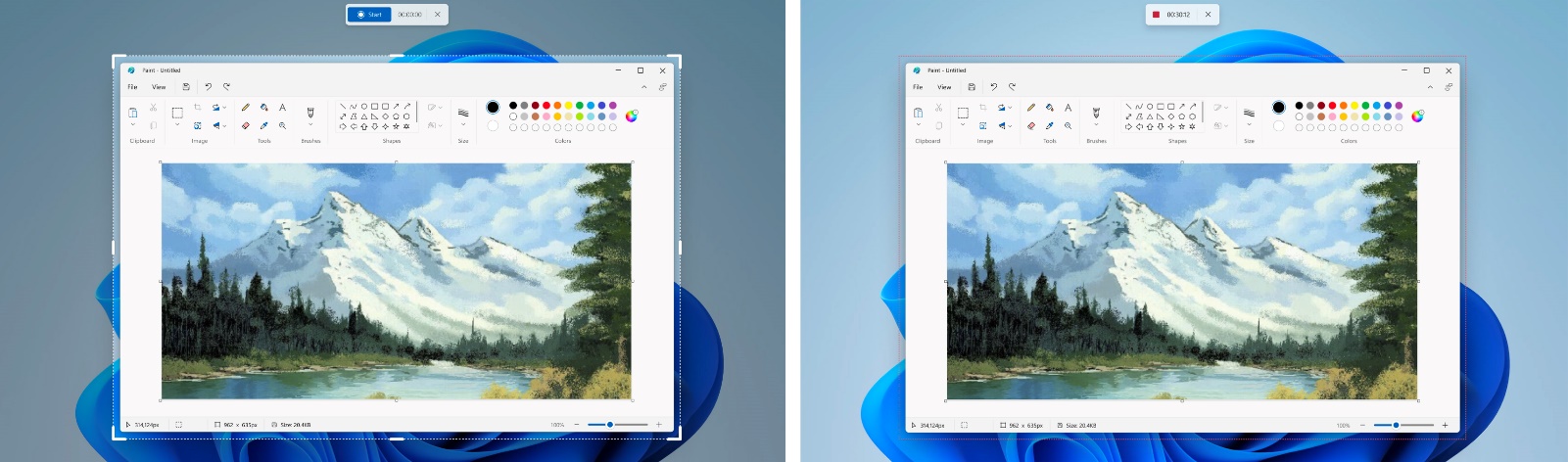
According to The Verge, Windows 11 trial users will receive the new version of Snipping Tool starting today. The recording tool of Windows 11, like Apple’s macOS, allows you to record the entire screen’s contents or a part of it.
This feature is handy for those who want to record only the contents of the application page. The new update comes about four years after the Windows Screenshot tool was redesigned.
The Xbox Game Bar tool does an excellent job recording apps’ screens, but its functionality is limited. The new Snipping Tool feature frees the user’s hands. The recent changes are only available through the Windows Insider developer channel and may not be released publicly for several weeks or months.
Apple’s macOS operating system has long offered a built-in and widely used screen recording tool.
FAQ
How do I start screen recording in Windows 11?
Open the Snipping Tool, switch from screenshot to video mode, click “New,” select the area to record, and hit Start.
Can I record audio while using Snipping Tool’s screen recorder?
No — currently, the built‑in recorder supports video only, not system or microphone audio.
Where are my recordings saved?
Recordings are saved in the Videos → Captures folder in MP4 format.