
Disabling Control Panel Using Group Policy

In Windows, the Control Panel is a software component that performs administrative and management tasks and provides access to specific software features.
It is used to configure and manage almost all aspects of Windows, including keyboard and mouse functionality, user and password settings, power options, network settings, desktop background, display settings, sound settings, mouse settings, hardware and software options, program installation and removal, parental controls, speech recognition, etc.
Techopedia explains
The control panel is usually part of the system’s graphical user interface (GUI), which provides easy management and access to panel components.
The control panel comprises a group of individual applets. Therefore, using it requires one or more applets to modify how certain parts of Windows work.
It is one of the most essential parts of the Windows operating system. In this training, I will teach you how to disable Group Policy in domain networks. In the, we can make most of an operating system’s vital and basic settings, so disabling this part can reduce security risks for a normal user.
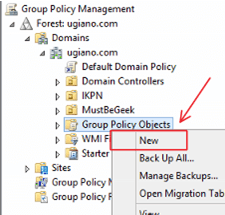
In the first step, we must enter the Group Policy Management console and create a Policy Object.
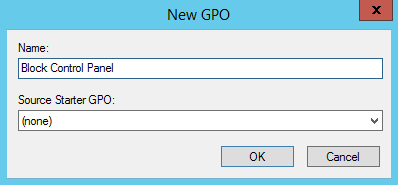
In the opened window, we enter the name of our object.
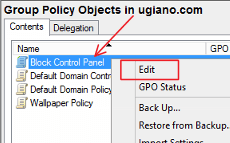
Right-click on the created object and select the Edit option.
In the opened window, follow the following path:
User Configuration > Administrative Templates > Control Panel
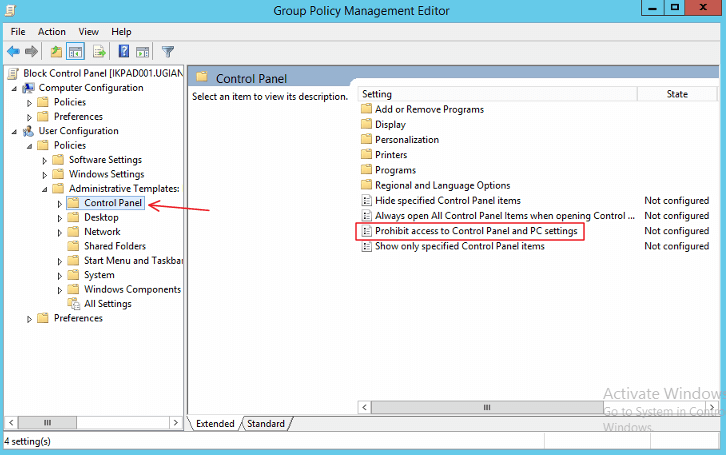
In the window that opens, select Enable and click OK.
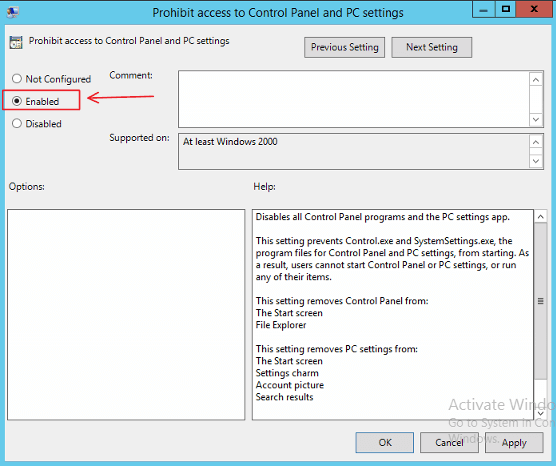 Note that we can consider the created object for a specific part of the network and its users. You can apply this object to one or more particular sections if you have categories in your active directory structure.
Don’t forget to apply this applet by running gpupdate /force in CMD, along with the others.
FAQ
How do you disable the Control Panel with Group Policy?
Use the Group Policy Editor to apply a policy that prevents users from accessing the Control Panel and Settings.
Why disable the Control Panel in an organization?
To restrict users from changing system settings that could affect security and configuration consistency.
Does this method work on all Windows editions?
It primarily works on Windows Pro, Enterprise, and Education editions that support Group Policy management.