
What Is Wi-Fi Direct and How Does It Work

Wi-Fi Direct Allows Two Devices to Establish a Direct, Peer-To-Peer (P2P) Wi-Fi Connection Without The Need For A Wireless Router. It is Similar To Bluetooth, But There Are Fundamental Differences.
Wi-Fi Direct is an official Alliance standard, and Wi-Fi Direct has been implemented. The World Industry Union is responsible for certifying the Wi-Fi Kit. This means you can be sure that any device with built-in Wi-Fi can work with all devices that support this feature without requiring special hardware.
The idea of Wi-Fi Direct is that simple tasks require simple connections. Suppose you want to send and print an image from a laptop or smartphone to a wireless printer, or share pictures with someone you are in the same room with, or even send your desired video from a mobile phone to a TV; None of this requires an active Internet connection or, in general, an Internet connection; But to do that, your device needs to be connected to a printer or someone else’s hardware or TV. With Wi-Fi Direct, all of these things are easily possible.
Devices can receive information through an access point.
Wi-Fi Direct enables devices to go through this process and connect directly to each other.
When most people think of connecting a device to another (D2D), the first thing that comes to mind is Bluetooth.
Wi-Fi Direct offers a Bluetooth-like connection, so you must first introduce devices with Wi-Fi Direct to connect. However, Wi-Fi Direct is much more potent than Bluetooth and can manage and send more data faster and over longer distances. If it is set correctly, Wi-Fi Direct can transfer data 10 times faster than Bluetooth on Android devices.
These advantages make Wi-fi Direct a better option for business applications that share data between devices.
What is Wi-Fi Direct, and how does it work?
Devices can be paired to Wi-Fi Direct in various ways. These include physical buttons (pressing a button on the first gadget and then pressing the same button on the second), PIN codes, QR codes, or even NFC.
Wi-Fi Direct does not require a centralized network or wireless router to share information between devices. Instead, when connecting, one device acts as an access point (AP) or hotspot, and other devices connect to the primary device using WPS and WPA/WPA2 protocols.
Wi-Fi Direct uses WPS and WPA/WPA2 protocols to establish a secure connection, prevent unauthorized communication, and keep the connection private. Once connected, even if not connected to the network, data can be shared immediately between surrounding devices.
Because devices with poor Wi-Fi connectivity can connect directly, there is no need to use a router. If necessary, devices with poor Wi-Fi connectivity can create an ad hoc network, allowing you to view available devices and choose which one to connect to.
Wi-Fi Direct enables direct communication between devices without a conventional router or wireless network.
To get acquainted with this subject, consider this example: Suppose you have to send a file to your friend but do not have access to a secure Wi-Fi connection. In this case, you can create an ad hoc network instead of connecting to the Internet.
You can wirelessly create an ad hoc network 100 meters between your device and your friend and send the file to him. Because your device is the host, the connection is terminated if you disconnect, no matter how many devices are connected to the AdHoc network simultaneously.
According to this example, the Ad hoc network is a type of temporary local area network (LAN). So, if you set up an ad hoc network permanently, it becomes a local network. With the help of an ad hoc network, multiple devices can access the Internet through the host device.
Wi-Fi Direct potentially includes two valuable options:
Finding Wi-Fi Direct Discovery Device and Finding Services (Service Discovery). Devices do not know by default what devices are around them, but if the developers have enabled this, your device knows what kind of devices are nearby and what each one does.
For example, if you want to display an image or movie, you will only see devices that can display images, or if you’re going to print a picture, you will only see printers or devices connected to printers.
Discovering the devices that work for you can happen before a connection is made, so that you do not spend time connecting to the wrong device.
Companies support Wi-Fi Direct.

Intel was the first major company to support Wi-Fi Direct, introducing a new standard for the Centrino 2 platform in 2008.
Two years later, other prominent players in the networking industry followed Intel; Marvel, Ralink, Broadcom, RailTech, and Atros launched the first Wi-Fi Direct products in 2010.
Your computer’s wifii card is probably made by one of these big manufacturers, and your modern PC or laptop most likely supports Wi-Fi Direct.
Microsoft has supported this standard since Windows 8, and all versions of Windows 10 are equipped with Direwifiifi. The first Xbox to support Direct was the Xbox One, released in 2013.
For mobile phones, Google introduced Wi-Fi Direct support in Android 2.3.
Apple iPhones have supported Wi-Fi since iOS 7, with various titles such as AirDrop and AirPlay. Many other devices, such as headphones and wireless printers, also support this feature. Most smart TVs use Wi-Fi Direct differently from Miracast’s wireless standard-based Wi-Fi Direct feature.
Different devices have different ways of making Wi-Fi Direct connections. As mentioned, some devices scan the QR code to start the connection. In some cases, you need to enter a PIN code, and in some devices, you have to press a physical button.
As Security issues become more critical, more and more devices are incorporating these techniques, and fewer devices are automatically connected.
Wi-Fi Direct Direct
The most common uses of Wi-Fi Direct include the following options:
Quick file sharing
Wi-Fi Direct is a great way to share large files quickly. This feature is fast, cost-effective, and secure when setting up a wired connection or when Internet access is impossible.
Printing with wireless printers
Direct can control a large amount of wireless information, so it’s a good option for fast, hassle-free printing.
Play and share the screen.
Wi-Fi Direct can be used for various screen-sharing activities, from running mobile games on a large screen to sharing photos on TV.
Group Game
If everyone has the same game on their phones and is connected to the same Wi-Fi network, they can play together by connecting directly to the Network.
Fast Sync
Some devices use Direct sync information and update media. This feature can speed up the process, especially when you need to add multiple new media items to your device simultaneously (e.g., updating an existing playlist).
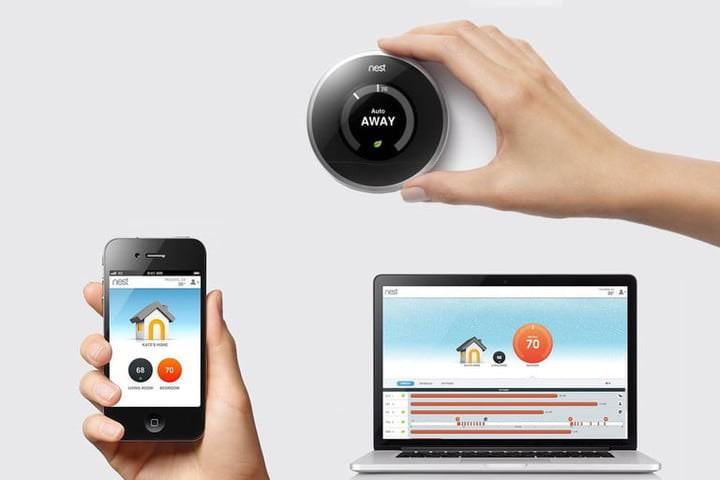
From what we have described, you may think that Direct is a promising technology for the Internet of Things. The issue of Wi-Fi Direct for smart home devices became hot in the late 2000s and early 2010s because the IoT connection was advancing rapidly.
Contrary to many people’s beliefs, the two technologies took different paths. Today, Wi-Fi Direct is rarely seen on the Internet of Things.
Wi-Fi Direct is a technology that enables two devices to connect directly without a wireless network. Internet of Things technology and Wi-Fit networks dominated Zigbee. Wi-Fi Direct was a direct trend that was quickly overtaken.
But why not Wi-Fi Direct in IoT?
The reason is simple. Today’s smart devices must be interconnected to provide more sophisticated management capabilities.
In a smart home, people who are away should be able to access their home appliances remotely. The lack of long-distance connectivity limits Wi-Fi’s reach and prevents it from being part of the Internet of Things.
Another reason why Dirmay is unsuitable for smart devices is that automatic connections can address Security issues, such as Wi-Fi Direct Security.

Wi-Fi Direct has minimal Security benefits compared to other communication options. However, the security risks are less. Wi-Fi Direct can be dangerous when a UA device simultaneously connects to another network. There is a risk if you use a direct connection to the device while connected to another network. Using older protocols such as WPS will make it easier for hackers to break into your information.
You should always ensure that your direct connection is secure. Anyone can access your information by receiving it via Wi-Fi Direct.
Learning how to secure your device is a good idea for staying safe when using Wi-Fi Direct. There are two types of Wi-Fi connections: temporary and permanent. A permanent connection allows you to save information on your device to make the connection automatically.
This type of connection is easier and faster, but it is dangerous for Security.
Since you can not contact unknown devices, it is best to restrict permanent connections. Unlike permanent connections, temporary connections do not happen automatically and are more secure. You can use temporary pins to ensure the connection is secure.
It is recommended to use newer Wi-Fi Direct connections with more Security features. However, it is better not to use them in public places. Hackers are always looking for new ways to steal information. A new bug in Linux devices recently allowed hackers to access mobile devices’ direct Wi-Fi capabilities.
FAQ
What is Wi-Fi Direct?
Wi-Fi Direct lets devices connect directly to each other without a central Wi-Fi network.
How does Wi-Fi Direct work?
Devices establish a peer-to-peer connection using Wi-Fi protocols for fast, secure communication.
Why use Wi-Fi Direct?
It enables quick file sharing, printing, and media streaming between compatible devices.