

How to Delete All Traces of Your Google Searches — Complete Privacy Guide

In This Article, We Will Learn How To Delete Google Search History And How To Delete it in Different iPhone and Android Browsers.
When you search on Google with Web & App Activity enabled, your activities, such as your search history, are stored in your Google Account. Google uses your stored activity across its services to provide more personalized experiences, such as app and content recommendations.
Regularly deleting your Google search history is an excellent way to protect your online privacy and security. This will protect your data from hackers and prevent you from receiving personalized content and app offers.
Furthermore, deleting Your Browsing History and personal data is one of the last essential steps before using a new browser. Fortunately, it is straightforward to clear Google Search on all devices. This article will teach you how to delete Google searches on your computer and phone.
How do you remove Google search history from a computer?
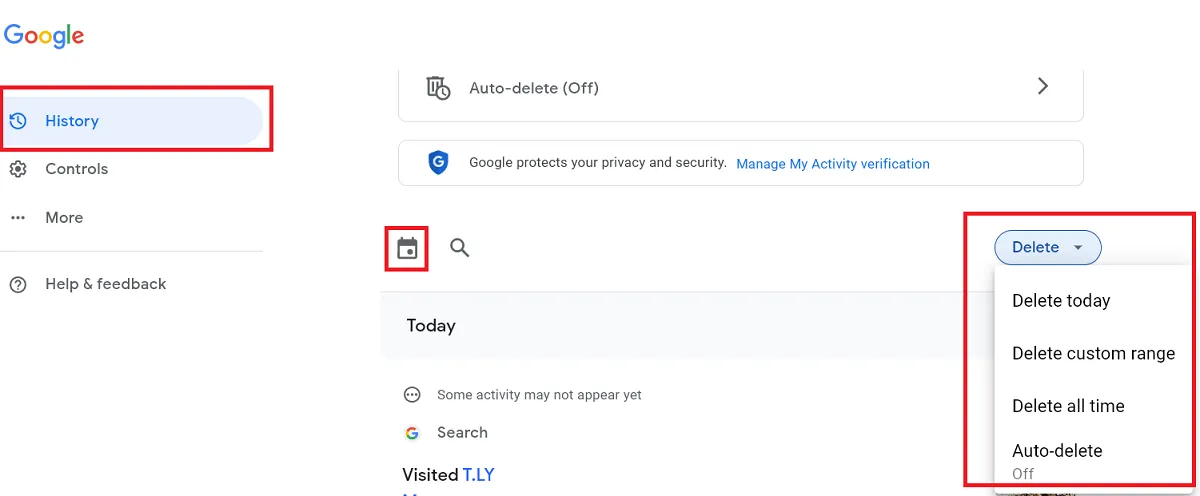
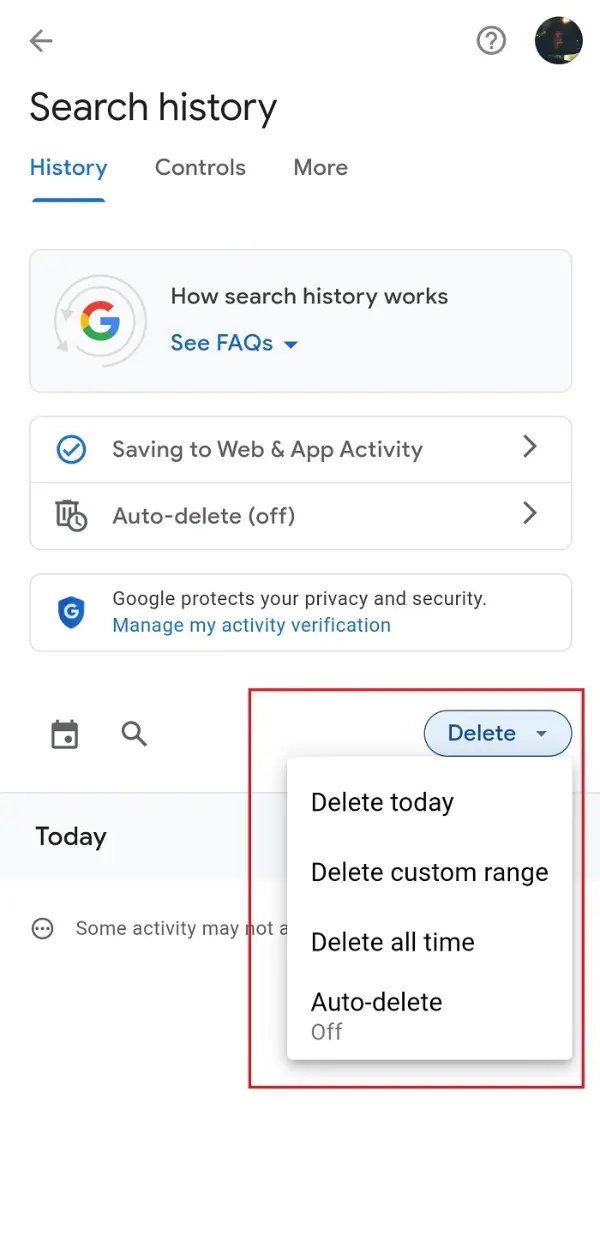
To remove the Google search history, click Search History in My Activity with your computer browser.
- Select the search history you want to delete. Click on Delete and choose one of the options:
- Delete today: Clear your browsing history.
- Delete custom range: allows you to delete the History of a period of your choice.
- Delete all time: clear the Google search history from the first use to now.
- Auto-Delete: This option automatically deletes searches based on your specific time and settings. However, even if you set your search history to auto-delete, you can still manually clear it at any time.
Clearing the Google search history on the phone
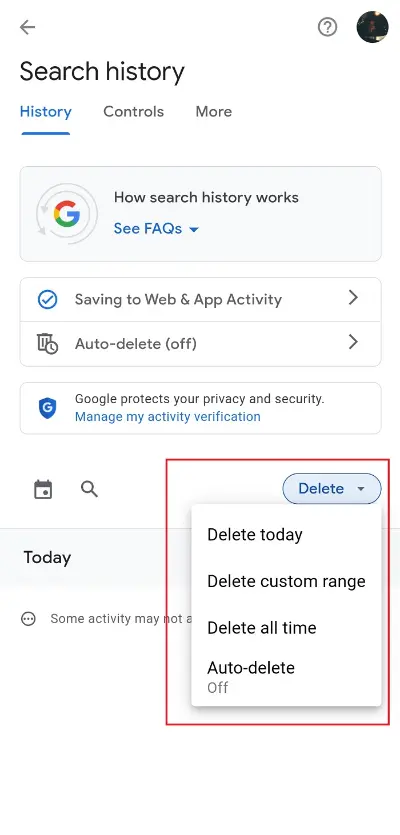
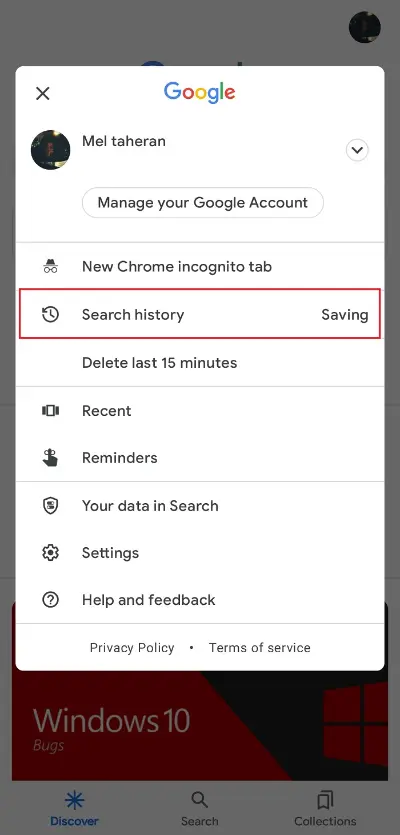
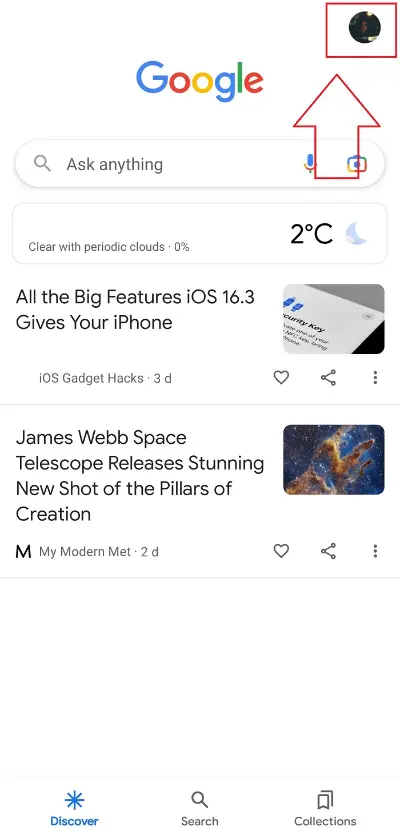
Clearing the Google search history on the phone is the same as the Google app on Android and iOS:
- Open the Google app and tap on your profile picture at the top.
- Select Search History.
- Click Delete to select the appropriate period, as in “How to delete Google search history on a computer?” We have explained. Then, choose an option.
Clearing Android Google Chrome History
Using Google Chrome on your Android phone lets you clear your search history directly in the browser.
- Open the Chrome browser app on your Android device.
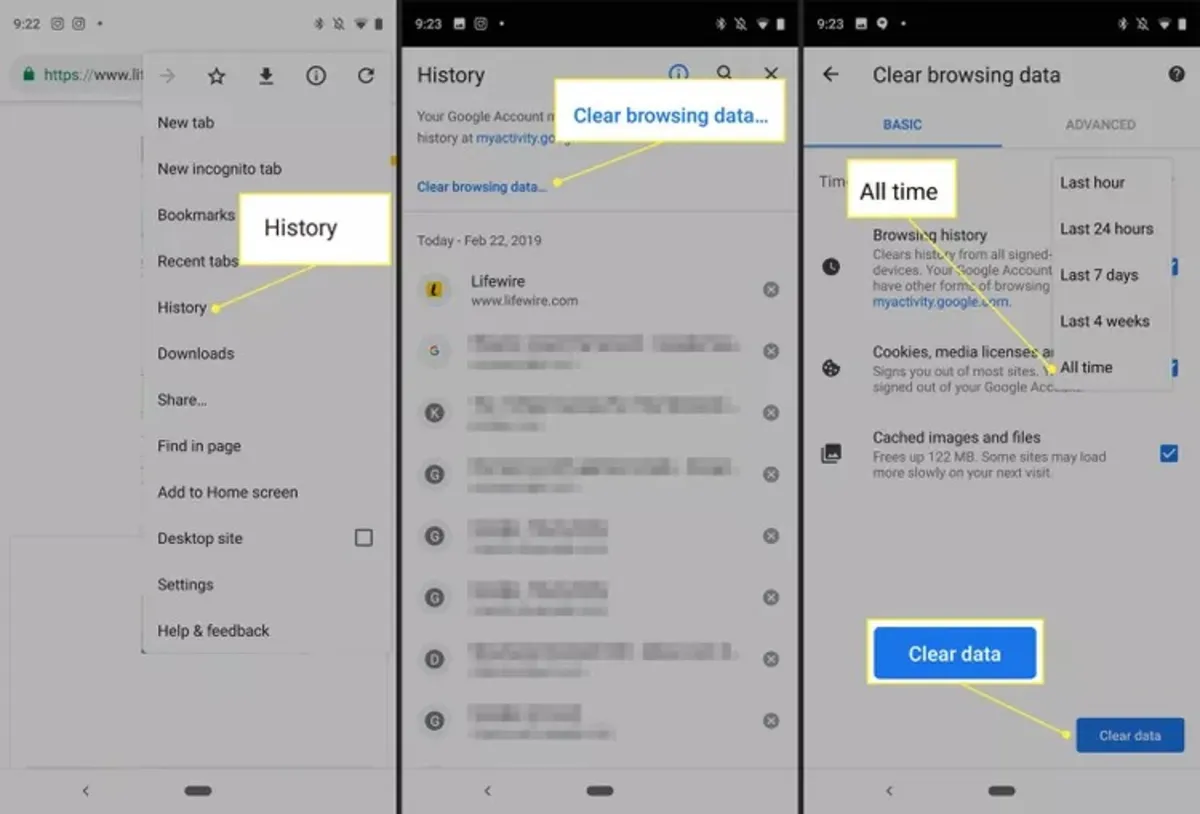
- Tap the vertical three-dot icon in the upper-right corner, then click History.
- To clear your browsing history, tap Clear browsing data. If you want to delete items from your History individually, scroll down to find them, tap the magnifying glass icon to search, then tap the X to the right of each item to delete it.
- To clear the entire History, tap the Time range drop-down arrow and select All time. In this drop-down menu, you can also choose the desired period. Remove the checkmark next to each item you do not want to be removed.
- Tap Clear data in the lower-right corner to clear the History in Google Chrome for Android.
Clearing Firefox search history for Android
If you use Firefox as a browser on your Samsung phone or Xiaomi phone, or your Android device as a whole, follow the steps below to delete your browsing history:
- Open Firefox.
- Tap the three-dot Settings menu.
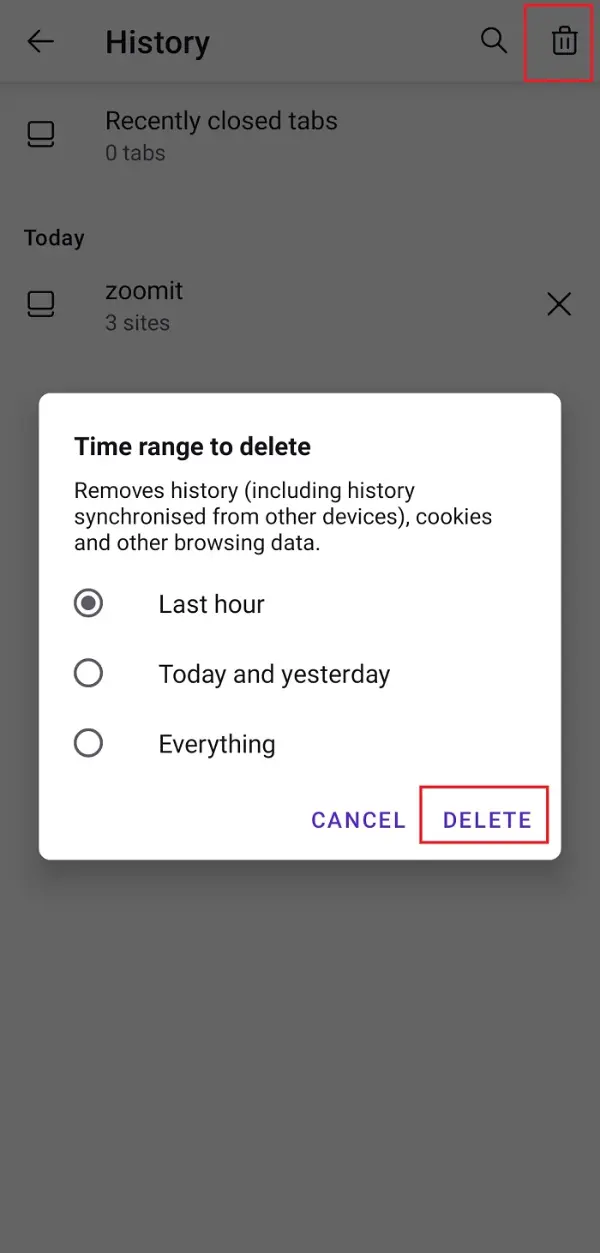
- Tap History.
- Tap Clear Browsing Data.
Clearing iPhone Safari search history
To clear your iPhone Safari search history, follow the steps below:
- Go to Safari from Settings.
- Tap on Clear History and Website Data.
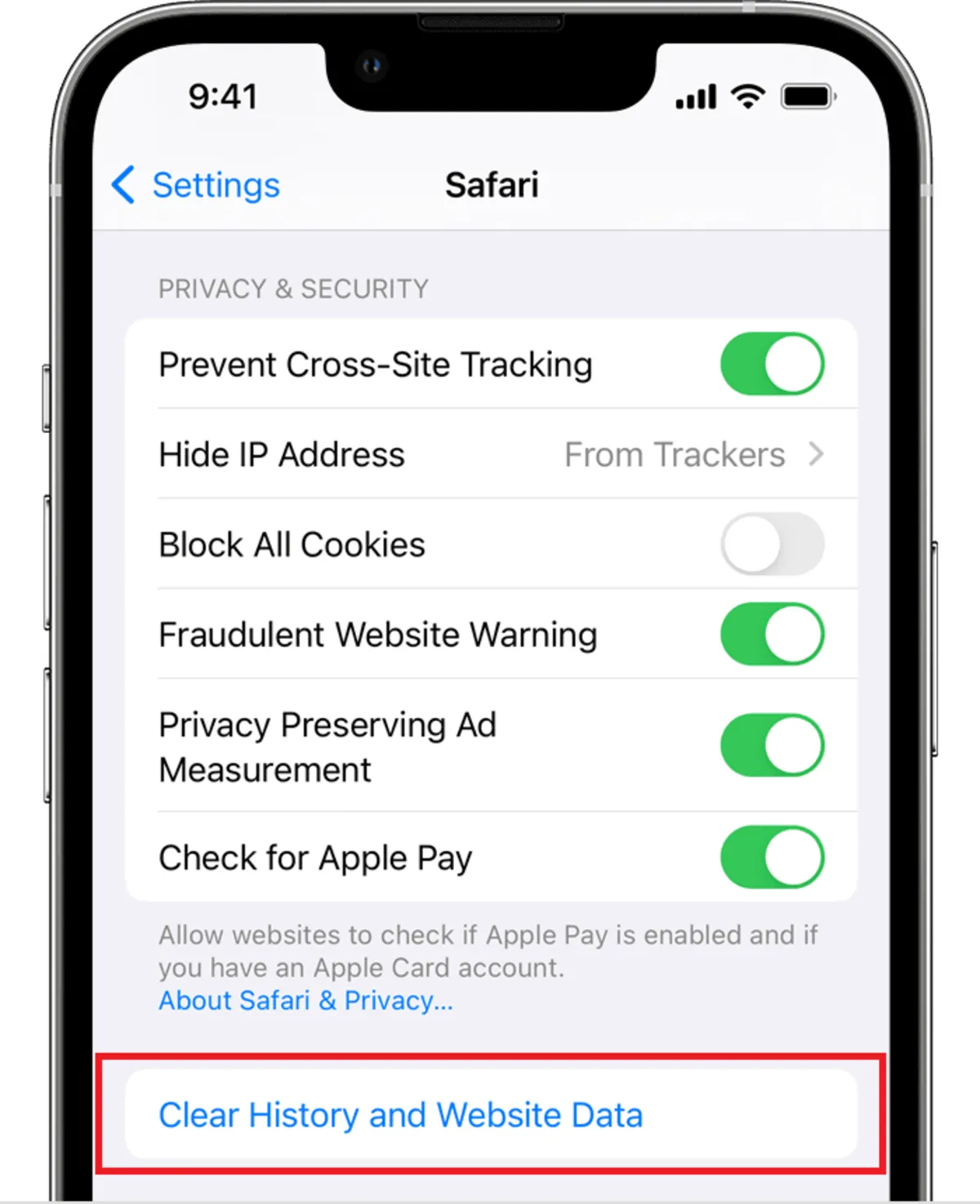
Clearing your History, cookies, and browser data from Safari on your iPhone won’t change your autocomplete information.
FAQ
How do I completely delete my Google search history?
Sign into your Google account, go to My Activity under Data & Privacy, choose “Delete activity by,” select “All time,” and confirm deletion of all search history.
Can I remove search history from my phone and browser?
Yes; on mobile use the Google app or browser settings to clear search history, and in browsers like Chrome use Clear browsing data to remove history and related entries.
Does deleting Google search history remove it permanently from Google servers?
Deleting history stops it from showing in your account and personalized services, but some data may remain on Google’s servers for operational or legal reasons.