
Everything You Need to Know About File Systems — How They Organize, Store and Manage Your Data

If You Are A Computer User, You May Have Heard The Term File Systems. How Your Information Is Stored, Managed, And Organized In Memory Depends On This System.
Computers use this system to store and organize data on storage media such as flash drives, hard disks, optical disks, and floppy disks.
Computer users need a brief understanding of file systems to quickly get things done with these tools and other digital gadgets. Therefore, we will share more information about file systems with you below.
What is a File System?
The file system manages how data is stored on the storage device. It is a small piece of software that helps the operating system organize data and use space more efficiently.
Think of the file system as a wardrobe. There are specific areas for shirts, shoes, and pants in this closet, so when you buy a new shirt, you know exactly where to put it.
File systems avoid wasting storage space by sorting data. It is precisely what the file system does to your data. When storing data, such as a movie or a video game, the computer uses the file system to know exactly where to keep the file.
Different operating systems use other file systems. For example, Windows uses NTFS, while Macintosh uses the Mac OS Extended File System (HFS+).
FAT file system
File system: He was born in 197 and initially used to manage floppy disk space. The system then files to DOS and Windows. Over the years, the FAT file system has undergone numerous updates, including increasing the maximum partition and file size.
The most notable update is that FAT32 versions are still used on low-capacity drives. If you have a flash or SD card with 16 or 32 GB, it is most likely from the FAT32 file system. These cards are used to manage memory, and you may encounter a file error indicating that the destination file system is too small when working with them.
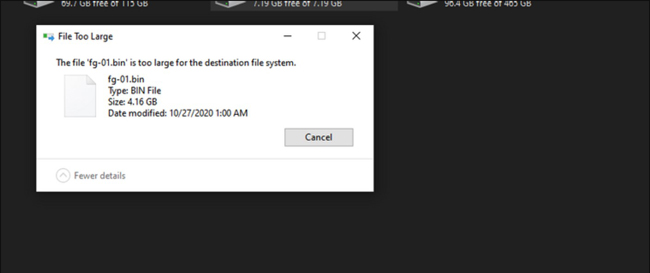
FAT32 does not support files larger than 4 GB. If you try to add a movie4KMove to it, you will encounter the error above. This file system also supports a maximum storage capacity of 32 GB.
Of course, this file system remains the most widely used due to its cross-platform compatibility. If your flash drive has less than 32 GB, you can use the FAT32 file system.
Microsoft NTFS file
System to overcome FAT32: The NTFS file system was introduced in 1993 and has since been developed.
Among the advantages of this file system over FAT32, the following can be mentioned:
- Supports a maximum storage capacity of 16 exabytes EB(Each exabyte equals one million terabytes) versus a maximum storage capacity of 32 GB FAT32
- Ability to store huge files against a full file size of 4 GB in the FAT32 system
- NTFS file system records all data procedure changes to disk. Therefore, in the event of a design failure or error, this registered information is automatically used to resolve the issue without the user’s knowledge.
- In this file system, data can also be encrypted.
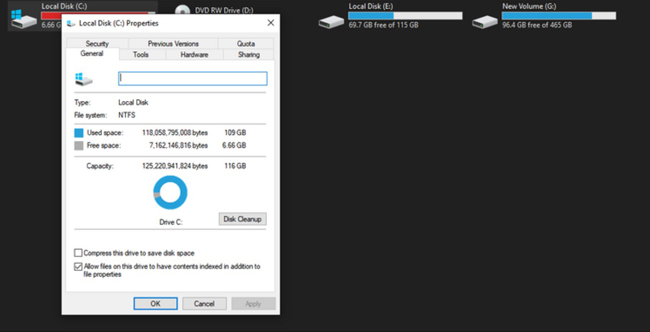
All these features make the NTFS file system a good option for Windows. In addition, Windows can only run on an NTFS file system. Unfortunately, older versions of Windows and Linux do not support NTFS. MacOS, also from NTFS, supports only a read-only file system.
Microsoft exFAT file system
In 2006, exFAT was introduced to replace FAT32. exFAT-FAT32 Limitations: Does not have a maximum storage capacity of 16 exabytes EB).
SDXC cards use the exFAT file system by default on cameras. In other words, all SDXC cards are formatted in exFAT. If a flash or SD card has a capacity greater than 32 GB, it is better to use the exFAT format.
Remarks on how to format the flash with the exFAT file system
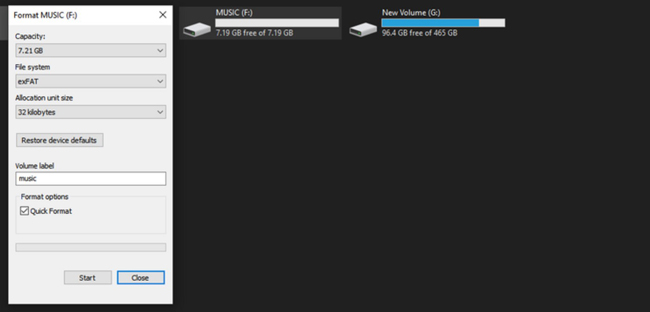
Before backing up your flash drive, ensure all data is backed up. For the exFAT-formatted drive, connect the drive to your computer. Right-click on the arrow and select Format.
Click the exFAT option in the Format Drive page of the File System. Also, check the Quick Format option—finally, the Start option—and then OK.
Finally, file systems organize data, but there are no standards. Different operating systems prefer other file systems. If you use different operating systems daily, it is better to use the manufacturer’s recommended default.
FAQ
What is a file system?
A file system is the method and structure by which an operating system organizes, stores, and retrieves files and directories on a storage medium.
Why is a file system necessary?
Without a file system, storage devices would be an unstructured block of data — making it impossible to reliably locate, read, or manage individual files.
What functions does a file system perform?
It handles file naming and directory hierarchy, allocates storage space, tracks metadata (like file size, dates, permissions), enforces access control, and ensures data integrity and efficient storage management.