


In this article, we will show you how to create and use your own personal Linux distribution based on common distributions.
Before you begin, let’s look at the prospects for this process.
A lot can be done thanks to the internal flexibility, scalability, and adaptability of open-source software. For example, you can decide to build a new product tailored to your specific needs.
The world of operating systems
We use computers daily and often have enough information about Windows and Mac. However, are you aware of the capabilities of the Linux operating system?
Windows and macOS are indeed the market-leading desktop operating systems, ranking third behind Linux. Still, some of Linux’s capabilities go beyond these two operating systems.
Microsoft Windows accounts for about 80% of the market and macOS for about 16%, so we see that Linux has a small market share, but wait, the reality is something else.
These numbers only reflect the use of Desktop operating systems. Did you know that Android runs on the Linux operating system? When you use Facebook, Instagram, or Google, you are using Linux.
Interestingly, in the world of server operating systems, Linux is a leader by a small margin.
What is the exact definition of an operating system?
An operating system connects the hardware you interact with to the software you want to run. When you press a key on the keyboard or look at the screen, you are communicating with the hardware in an intangible way.
When you run your web browser and use it to interact with the web, it executes code on the CPU.
However, these processes are not performed directly; you first interact with the operating system and then with the hardware. The operating system translates and manages hardware conversations so the software can use them.
To better understand this issue, pay attention to Figure 1.
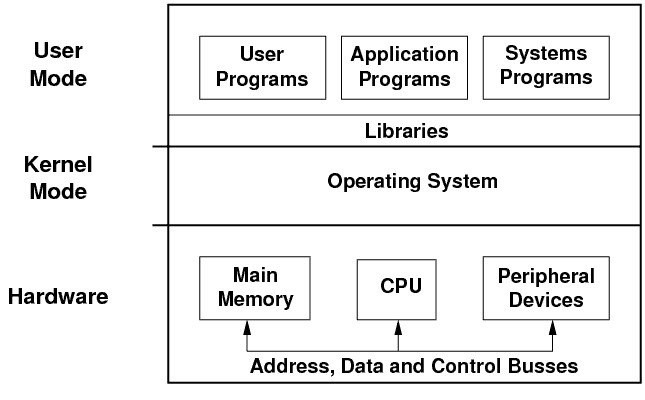

figure 1
As shown in Figure 1, there are three hardware abstraction layers: kernel mode, user mode, and system mode. These layers combine to allow you to use the system hardware properly. The operating system interfaces with hardware, applications, and system applications.
The operating system allows applications and developers to interact with hardware through its libraries.
What is Linux?
Some users misunderstand Linux as an operating system. This notion is incorrect because Linux is software that communicates directly with the hardware. At the same time, a real operating system does far more than just interact and includes software libraries, a runtime component, and, typically, a set of default executable tools.
Most Linux distributions use the GNU operating system, designed by Richard Stallman for free and open-source software. GNU The title GNU’s Not Unix is a pseudo-Unix operating system developed by the GNU Project and released as open-source software.
GNU includes everything from compilers to system libraries and system applications.
In the world of Linux, we often use the term “GNU + Linux,” more colloquially than “GNU / Linux,” to indicate that the Linux operating system combines the two.
Many Linux distributions today are often lightweight and used in embedded systems. However, most Linux distributions are based on popular distributions such as Debian and Ubuntu.
Open-source software versus free software
The Linux kernel is known as open-source software because its source code is available to users. Any user can read and modify the source code.
In this case, developers can find bugs as members of the Linux community or add new features to the intended distribution. Open-source software based on the developer community concept has more flexibility than proprietary and closed-source software, such as Windows.
Developers worldwide can view and edit code, improving software quality, troubleshooting, and software Security.
Open-source software is usually free, and the most popular ones are VLC, MediaWiki, and Firefox.
That is why the open-source Development model has become a widespread and vital ecosystem.
On the other hand, there is more free software than open-source software. Free software provides interesting ways for developers to make money through this Development model.
Developers can benefit from the free model by offering advertising-based solutions or in-app purchases.
In contrast to these two models is proprietary software, such as the Microsoft Windows operating system, which does not belong to the user; the user is only allowed to use it.
In this case, users are unable to view the code and any reverse engineering, editing, or republishing of the code by illegal users. That’s why open-source software and operating systems have come to developers’ attention.
Why do we need to create a Linux distribution?
With so many Linux distributions out there, you might wonder why we should build a new distribution when existing ones offer different capabilities.
No operating system in the world can be completely user-friendly. For example, some organizations prefer to use an operating system that inherently blocks access to specific ports, or parents choose to use an appropriate operating system for their children, in which case you may have to create your own Linux distribution.
Building a Linux distribution is not as difficult as it sounds, but it is a time-consuming process if you use the right tools.
There are many tools for this purpose, some of which are well known. In this article, we will get acquainted with eight of these tools.
-
Linux Respin
Linux Respin is a branch of the popular Remasterys tool that has stopped updating. Remasters was one of the most popular tools for building Linux distributions or backups. However, Linux Respin is a good alternative to this tool. Although it offers fewer capabilities than Remastersys, it performs acceptably when building Linux distributions.
Linux Respin is only available in conjunction with Debian, Mint, and Trisquel distributions, which have limited its use. The downside to the above tool is the not-so-powerful documentation provided for it.
-
Linux Live Kit
The Linux Live Kit is a tool for building a custom Linux distribution or backup system. It supports Debian by default, but can be used with other distributions, provided they support the aufs and squashfs kernel modules.
The Linux Live Kit provides a user with a short, efficient tool that is far from the usual complexity, allowing them to create the desired distribution without any problems.
-
Ubuntu Imager
Ubuntu Imager is the ideal tool for building Ubuntu-based Linux distributions. Although it is not the only option available to Ubuntu, its many good features make it a perfect choice.
-
Linux from Scratch
If you want to monitor the features and applications added to a custom distribution when building it, I suggest using the Linux From Scratch tool. Fortunately, detailed documentation for LFS is provided, and it is not only ideal for creating a Linux distribution but also an excellent resource for learning Linux.
Linux From Scratch lets you build your own custom Linux system entirely from source code. Although LFS has different functionality from the other tools we introduced in this article, it is ideal for building a personal Linux distribution.
-
Slax Modules Tool
If you are looking for a simple Slackware-based distribution, the Slax Modules Tool is for you. The above tool is especially suitable for people who want to create a lightweight, live version to run a system. Slax Modules Tools are based on Slackware and allow users to call different modules.
Note, however, that the above approach is somewhat outdated. For newer versions of Slax, it is recommended that you use apt to install software instead of modules.
-
Live Magic
Live Magic is another tool for building Debian-based distributions. However, the tool has capabilities far beyond building Debian-based distributions. Live Magic can create CDs, flash drives, and netboot images. This tool is easier to use than the options presented in this article; however, it cannot make a picture of the distribution you are using.
However, the tool wizard allows you to apply the configurations you want. This program can fetch packages from repositories and place them in your desired image.
-
Revisor
Revisor is another powerful tool for building custom distributions. It lets you create personalized Fedora-based distributions.
Revisor allows you to create a Media Installation for the permanent distribution installation on the computer, preparing a live version that can boot a system. This solution is beneficial for data recovery and resolving operating system issues.
-
Customizer
A customizer is a tool that lets you create an Ubuntu-based distribution, though it also supports Xubuntu and Kubuntu. The only major drawback of this tool is that when building a distribution, your hosting system must have the same architecture as the operating system you intend to rebuild.
Real experience building a TOS Linux distribution
You probably haven’t heard of the TOS distribution, a personal distribution designed by Tom Meyer based on Ubuntu.
“When I decided to create this distribution, I got a lot of information about how to use Linux, and I was able to use a stable distribution,” he says.
The distribution I use today is for everyday activities.
When I started the build process, I was curious to test different distributions, such as Ubuntu, Kubuntu, Fedora, Manjaro, and Arch Linux, to see which features from other distributions can be used in TOS. When I installed Arch Linux on my laptop, I installed it on my Desktop computer.
To do this, I wrote a shell script that would automatically install Arch Linux with all the dependencies and applications I needed. I quickly identified and fixed bugs in the installation script. During this time, I added new features I needed to the above script, significantly improving its usability in a short period.
“Eventually, I was faced with a script, so I decided to create application components and infrastructure that could communicate with each other, and thus TOS GNU / LINUX was born.”
TOX Linux has a graphical installer that installs the operating system on the hard drive. It is responsible for installing various processes, such as hard disk partitioning / solid-state memory, creating groups and users, installing necessary packages from the TOS repository, configuring the operating system (keyboard, permissions, support repositories, etc.), setting up the boot process, and preparing and validating the environment.
Each of these components has its configuration. For example, users can specify how to configure the environment, what file system to use, and how to encrypt data. TOS uses packet signatures to prevent middleman attacks.
In other words, each package is compressed (in a zip or zstd file) and signed with a private key after compression, then placed in the appropriate repository. The Desktop environment of the TOS distribution is shown in Figure 2.
The Desktop environment is the central part of the operating system, which provides a graphical interface for managing daily activities.
In other words, each package is compressed (in a zip or zstd file) and signed with a private key after compression, then placed in the appropriate repository.
Figure 2 shows the desktop environment of the TOS distribution. The desktop environment is the central part of the operating system and provides a graphical interface for managing daily activities.
In other words, each package is compressed (in a zip or zstd file) and signed with a private key after compression, then placed in the appropriate repository. The Desktop environment of the TOS distribution is shown in Figure 2.
The Desktop environment is the central part of the operating system, which provides a graphical interface for managing daily activities.
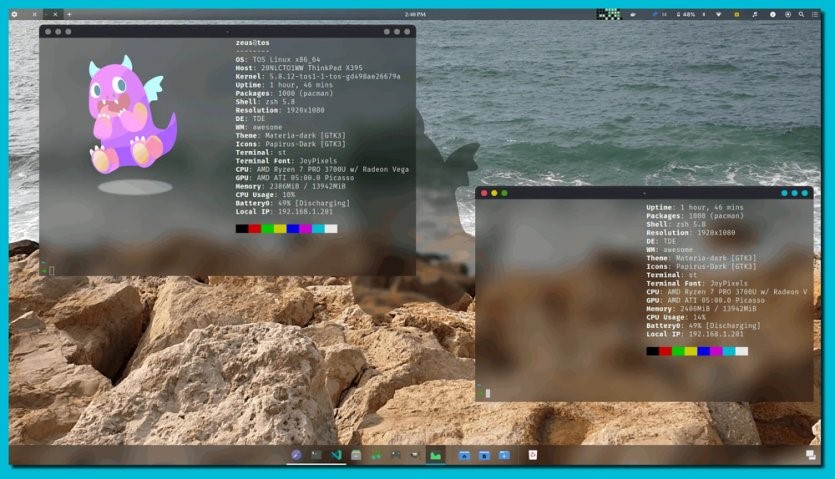

figure 2
The most important tasks performed by this Desktop environment are managing applications/windows, providing a set of default applications (word processor, file manager, settings, and similar examples), managing communication modes (WiFi, Bluetooth, screen settings, keyboard layout), management Mentioned permissions (request for password or fingerprint), visual effects management of icons, templates, folders, mouse pointer, background image, and login management. The TOX bootloader supports multiple operating systems.
In other words, it can be used with other Linux, BSD, macOS, and Windows distributions. Therefore, it is possible to use TOS Linux alongside Windows. Figure 3 shows the architecture of this distribution.
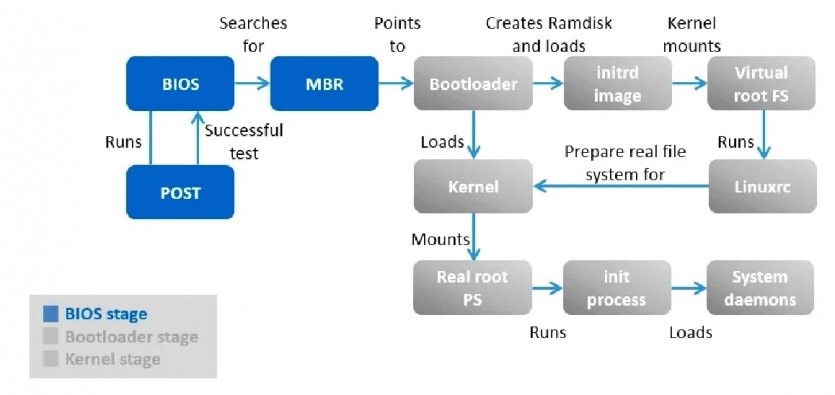

Figure 3
last word
These tools help you build personalized Linux distributions by offering a range of solutions. However, the level of complexity and capabilities they provide are not the same.
In this article, we have introduced tools that help you prepare a distribution tailored to the needs of the work.
FAQ
Can I build my own Linux distro without deep Linux-kernel knowledge?
Yes — using tools like distribution builders or remastering kits, you can start from an existing distro and customize packages, configuration, and defaults without rebuilding the kernel.
What are common methods to create a custom Linux distribution?
Methods include using live-kit or remastering tools, deriving from a base distro with selected packages, or using minimal-root-filesystem builds for full control.
How do I test or install my custom Linux distribution?
You can create an installable ISO or root-filesystem archive, then boot or import it (on bare metal or virtual/machine/WSL) to install or run it.