


One of the key factors Google considers when ranking web pages is page load speed. A fast-loading website enhances user experience and increases the likelihood of appearing in top search results. To help website owners analyze and optimize their site’s performance, Google provides a free tool known as Google Page Speed Insights (PSI). This article explores the significance of Google PageSpeed Insights, how it works, and best practices for optimizing your website’s performance.
What Is Google Page Speed Insights?
Google PageSpeed Insights (PSI) is a free web performance analysis tool from Google. It evaluates a webpage’s load speed and overall efficiency and assigns a performance score between 0 and 100. A higher score indicates better performance, with Google’s ideal target being 90 or above.
PSI analyzes both desktop and mobile versions of a website, identifying key performance issues and providing actionable recommendations for improvement.

How to Use Google Page Speed Insights
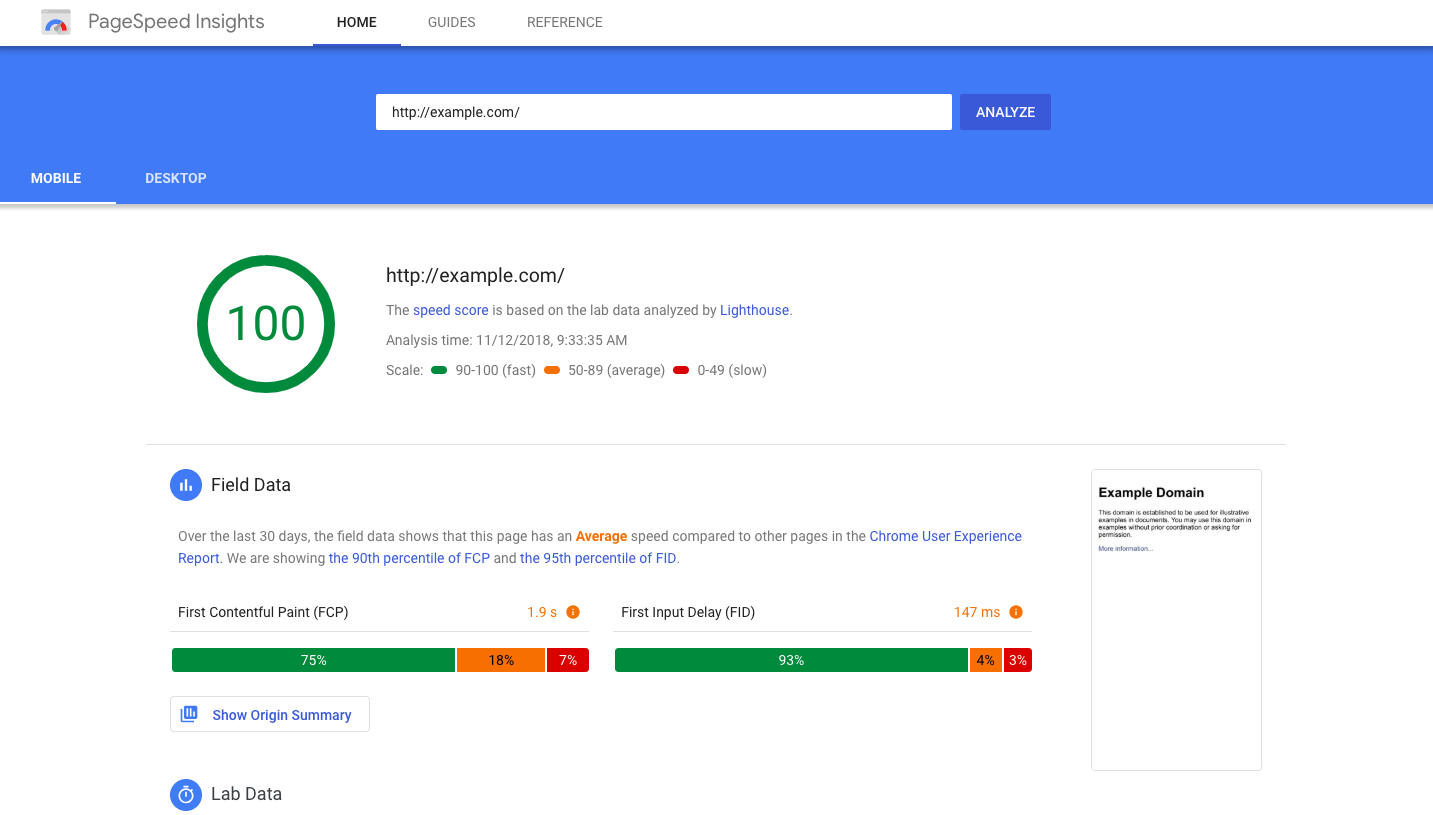
Step 1: Accessing the Tool
Go to the official Google Page Speed Insights website.
Step 2: Entering Your URL
Copy and paste your website’s URL into the provided field and click Analyze.
Step 3: Viewing Results
Once the analysis is complete, you will see performance scores and detailed metrics for both mobile and desktop versions of your site.
Key Metrics in Google Page Speed Insights
PSI evaluates several performance factors that influence user experience and search engine rankings. Here’s a breakdown of the most critical metrics:
1. First Contentful Paint (FCP)
- Definition: The time it takes for the first piece of visible content (such as text, images, or graphics) to appear on the screen.
- Ideal Score: Below 1.8 seconds.
- Optimization Tips:
- Minimize render-blocking resources (CSS and JavaScript).
- Optimize images and use modern formats like WebP.
2. Speed Index (SI)
- Definition: Measures how quickly the visible content loads.
- Ideal Score: Below 4.3 seconds.
- Optimization Tips:
- Use efficient lazy loading techniques.
- Implement Content Delivery Networks (CDN) to serve content faster.
3. Largest Contentful Paint (LCP)
- Definition: Measures the time it takes for the most significant visible content element (such as an image or heading) to load fully.
- Ideal Score: Below 2.5 seconds.
- Optimization Tips:
- Reduce server response time.
- Compress large images.
- Enable browser caching.
4. Time to Interactive (TTI)
- Definition: The time it takes for the page to become fully interactive and responsive to user inputs.
- Ideal Score: Below 3.8 seconds.
- Optimization Tips:
- Minimize third-party scripts.
- Use asynchronous loading for JavaScript files.
5. Total Blocking Time (TBT)
- Definition: Measures the delay between when the page starts loading and when it becomes interactive.
- Ideal Score: Below 300 milliseconds.
- Optimization Tips:
- Reduce unnecessary JavaScript execution.
- Optimize rendering processes.
6. Cumulative Layout Shift (CLS)
- Definition: Measures how much page elements shift unexpectedly while loading.
- Ideal Score: Below 0.1.
- Optimization Tips:
- Set explicit dimensions for images and ads.
- Avoid inserting dynamic content above existing elements.
Opportunities and Diagnostics Sections
1. Opportunities Section
This section provides suggestions to optimize page performance. Fixing these issues can significantly improve loading times.
2. Diagnostics Section
This section provides additional insights into how the site is functioning but does not necessarily impact the score directly.
3. Passed Audits Section
Displays areas where the website has already met Google’s performance standards.
Best Practices to Improve Your Page Speed Score
To enhance your website’s performance and achieve a higher PSI score, follow these best practices:
- Use a Content Delivery Network (CDN) to distribute content efficiently.
- Optimize images by reducing their size and using next-gen formats like SVG and WebP.
- Enable lazy loading to load images only when needed.
- Minify and compress code (HTML, CSS, and JavaScript).
- Improve server response time by choosing reliable hosting solutions.
- Leverage browser caching to store frequently accessed files locally.
- Reduce render-blocking resources by deferring unnecessary scripts.
Conclusion
Page speed is a crucial factor for both SEO and user experience. A slow-loading site can lead to higher bounce rates and lower search engine rankings. Google Page Speed Insights provides valuable insights into your website’s performance and offers recommendations to improve load times. By implementing these best practices, you can ensure a faster, more efficient, and user-friendly website, ultimately boosting your SEO rankings and user satisfaction.
By optimizing for Google Page Speed Insights, you’re not only improving your site’s technical health but also creating a better experience for your visitors.
FAQ
What does Google PageSpeed Insights do?
It analyzes your website’s speed and performance on mobile and desktop and provides optimization suggestions.
How do you interpret the PageSpeed score?
Scores range from 0–100; higher scores indicate better performance and faster page loading.
Can PageSpeed Insights help improve SEO?
Yes, optimizing speed and performance based on its recommendations can enhance user experience and search rankings.