


JavaFX is a platform for building rich web applications. Rich web applications are a specific type of application that offer the same capabilities and user experience as desktop applications.
Javafx: These apps give users a better visual experience than regular apps. Rich applications were initially called Rich Internet Applications (RIAs) and were delivered as browser plugins or virtual machines that converted traditional static applications into improved, streamlined, and attractive versions.
Over time, this programming paradigm underwent significant changes and was eventually renamed JavaFX.
In rich applications, the presentation of graphic elements and effects is managed on the client side because the plugin provided for this purpose can support rich graphics.
Technologies for creating rich web applications
Adobe Flash, Microsoft Silverlight, and JavaFX are used to build rich web applications.
Adobe Flash
Adobe Systems provides this software infrastructure for developing and building rich web applications. In addition, Adobe Flash can be used to create other applications, such as vectors, animations, browser-based games, desktop applications, mobile applications, and games.
However, official support for Adobe Flash was discontinued entirely in 2020, and even operating systems and browsers do not support it.
Microsoft Silverlight
Like Adobe Flash, this platform is a software framework for building, developing, and executing rich web applications, mainly used for multimedia streaming. Newer framework versions use better graphics, animation, and multimedia capabilities than earlier versions.
JavaFX
Is it a Java library used to develop rich web applications? The programs created by this library can be run on most browsers using Java technology.
What is JavaFX?
JavaFX is a Java language library for building rich web applications. Programs written in this programming language can run on various platforms.
In addition, applications developed with JavaFX run on a wide range of devices, including desktops, smartphones, smart TVs, tablets, and other smart devices. In the past, Java programmers used libraries such as Swing and the Advanced Windowing Toolkit to build GUI applications.
However, after the release of JavaFX, programmers saw it as a viable alternative to common examples because of its extensive capabilities for developing graphical user interface applications.
How was JavaFX born?
JavaFX was first designed by software engineer Chris Oliver while working at SeeBeyond Technology. Sun Microsystems then bought it and continued its development. The project was initially called Form Follows Function (F3) and aimed to provide rich user interfaces for developing GUI applications, but it was renamed JavaFX after being acquired by Sun Microsystems.
In 2007, JavaFX was officially introduced at the JavaOne Conference, an annual web conference. So, in 2008, NetBeans was integrated with JavaFX, and a standard Java development kit for JavaFX 1.0 was released.
In 2009, Oracle acquired Sun and released JavaFX 1.3. Different versions of this library continued to be published until September 2020, when JavaFX 15 was released. From Java 8 onwards, the Java Development Kit (JDK) was made available to developers, along with the JavaFX library.
Therefore, to run JavaFX applications, you must have Java version 8 or higher installed on your system. In addition, most integrated development environments, such as Eclipse and NetBeans, fully support JavaFX.
What features does JavaFX have, and what is it used for?
Java programmers use various libraries to build client-side applications with rich capabilities, including user interface controls, 2D and 3D graphics, and multimedia.
JavaFX provides developers with all of these features in a single library. In addition, it provides access to other features such as Swing. JavaFX provides a complete set of graphical and media programming interfaces and uses a computer graphics processor through graphical acceleration.
In addition, JavaFX provides interfaces that programmers can use to combine graphical animations and user interface controls. JavaFX can also be used with Java Virtual Machine (JVM) technologies such as Groovy, JRuby, and Java.
- Programming in Java: The JavaFX library is written in Java and can be used with all languages that run on a Java virtual machine, such as Java, Groovy, and JRuby. Applications written with JavaFX, like Java, are platform-independent.
- FXML: JavaFX supports a markup language called FXML, similar to HTML. This language defines the user interface.
- Scene Builder: JavaFX includes a robust component that integrates with development environments such as Eclipse and NetBeans. The above component enables drag-and-drop design in integrated development environments. In addition, developers can use the above technique to build FXML applications.
- Swing Interoperability: In a JavaFX application, you can embed Swing content using the Swing Node class. In addition, developers can upgrade existing Swing applications with JavaFX capabilities, such as embedded web content and rich graphical media.
- Internal user interface controls: The JavaFX library provides standard user interface controls that developers can use to build a complete application.
- CSS-like styling: This infrastructure provides a CSS-like styling method. Developers with basic CSS knowledge can easily style applications using this template.
- Native user-programming and print interfaces; JavaFX: provides a custom canvas that gives access to a real-time animation mode. Inside the JavaFX.scene.canvas package is a set of canvas classes that can draw directly inside a JavaFX scene. Additionally, developers can use the classes inside the JavaFX.print package to print shapes.
- Complete set of application programming interfaces: JavaFX provides developers with a wide range of APIs for developing GUI applications, 2D and 3D graphics, and more. These interfaces allow developers to access key features of the Java platform. These include generics, annotations, multithreading, lambda expressions, observable lists, and maps. These capabilities allow developers to scrutinize changes to data models.
- Integrated Graphics Library: JavaFX provides specialized 2D and 3D graphics classes with some Adobe Flash capabilities.
- Graphic Pipeline: JavaFX supports graphics via the graphics hardware-acceleration pipeline called Prism. When used with this powerful graphics card, graphics are displayed in a more realistic way. If this accelerator cannot support the graphics card, it resets the default Prism values to software processing mode.
JavaFX architecture
JavaFX provides a fully functional programming interface of classes and interfaces for building GUI applications with rich graphics. The most important packages of this application programming interface should be mentioned as follows:
- Javafx. Animation: This class includes classes for adding transition-based animations, such as fill, fade, rotate, scale, and translation, to JavaFX nodes.
- Javafx. Application: This contains a set of classes responsible for the life cycle of JavaFX applications.
- Javafx.css: This contains a set of classes for adding CSS to JavaFX GUI applications.
- Javafx. Event: Includes classes and interfaces for managing events in JavaFX. Event.
- Javafx. Geometry: Contains classes used to define two-dimensional objects and execute operations on them.
- Javafx. Stage: A set of high-level container classes is used to maintain javafx.stage.
- Javafx. Scene: This class contains classes and interfaces to support scene graphs. It also supports packages such as Canvas, chart, control effect, image, input, layout, media, paint, shape, text, transform, web, etc.
Figure 1 shows the JavaFX API architecture. It shows that important and influential components support the JavaFX API.

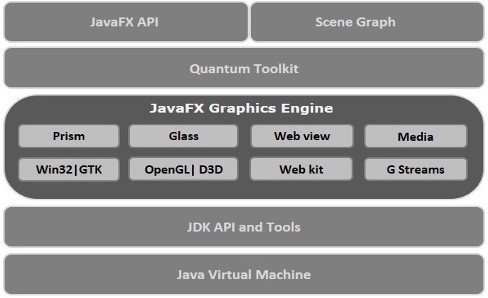
figure 1
Scene Graph
GUI applications in JavaFX are coded using a Scene Graph. The scene graph is the starting point for building GUI applications that meet the basic requirements of the graphical interface by defining nodes. Here, the node refers to a visual or graphic object that has the following properties:
- Geometric objects: Two-dimensional or three-dimensional objects such as circles, rectangles, polygons, etc.
- User controls: Objects such as buttons, menus, drop-down menus, text areas, and more.
- Containers: Layout sections that define elements such as borders, grids, rotations, and more.
- Multimedia elements: Includes items such as audio, video, and video.
In general, each set of nodes forms a scene graph. These nodes are defined in a hierarchy like network two.
Each node in the scene graph has a single parent. A node with no parent is called a root node. In the above architecture, each node can have one or more children. Childless nodes are known as leaf nodes, and childless nodes are known as branch nodes.
Prism
Prism is a high-performance graphics hardware acceleration pipeline for JavaFX graphics processing. This processing engine can process 2D and 3D graphics.
Prism uses DirectX for graphics processing on Windows and OpenGL on Mac, Linux, and embedded operating systems. Prism uses software to process graphics when the GPU lacks the necessary capabilities.
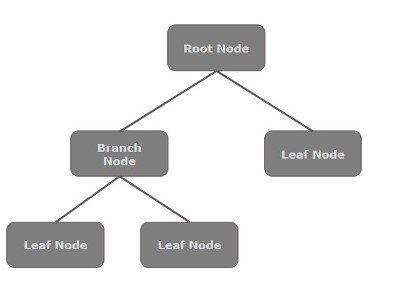

figure 2
GWT
The Transparent Windowing Toolkit (GWT) is a Glass Windowing Toolkit for managing windows, timers, levels, and events. In addition, GWT connects the JavaFX platform with the operating system.
Quantum Toolkit
The above component provides an abstraction layer over the low-level components of Prism, Glass, Media Engine, and Web Engine so that the user can use JavaFX regardless of the technical complexity. It also connects Prism and GWT.
WebView
Developers can use JavaFX to embed HTML content in a scene graph. WebView is one of the most critical components of JavaFX used to process this content model. This component uses WebKit, an internal open-source web browser engine.
This component supports a range of technologies, including HTML5, CSS, JavaScript, DOM, and SVG. WebView allows developers to process HTML content from local or remote URLs, support history, provide back-and-forth navigation, reload content, apply special effects to web components, edit HTML content, execute JavaScript commands, and manage events.
Multimedia Engine
The JavaFX multimedia engine is based on the Streamer open-source engine. It supports the playback of video and audio content. The JavaFX.scene.media package contains classes and interfaces for managing multimedia functionality in JavaFX. This package comprises three components: Media Object, Media Player, and Media View.
The structure of JavaFX applications
In general, a JavaFX program consists of three components: Stage, Scene, and Nodes. Figure 3 shows how these components relate to each other.
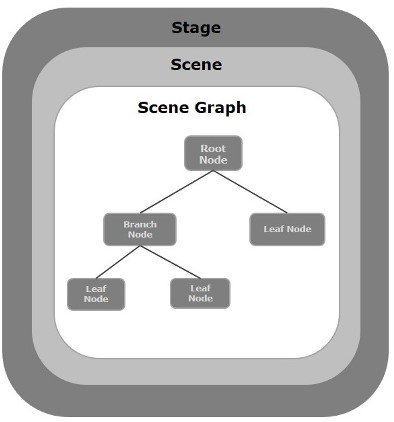

Figure 3
TStage
The stage is a window that contains all JavaFX objects and applications. The stage class, part of the JavaFX.stage package, is used to display this window. JavaFX itself creates the initial stage, and then the Stage object is passed as an argument to the start() function of the Application class. A stage has two parameters, Width and Height, that specify its width and height.
This class is divided into two parts: Content Area and Decorations. There are generally five stages in JavaFX: Decorated, Undecorated, Transparent, Unified, and Utility. To display Stage content, you must use the Show () method.
Scene
The scene shows the physical content of a JavaFX application. This element stores all the content of a scene graph. This class is in the JavaFX.scene package, which is responsible for displaying the scene object.
Scene graphs and nodes
A Scene Graph is a hierarchical data structure representing a page’s content. A scene can contain a node object that includes two- and three-dimensional geometric objects, user interface controls, various containers, and multimedia elements. The JavaFX.scene package’s Node class manages all nodes.
In JavaFX, a node can have one of three modes:
- Root Node: The first graph built into JavaFX.
- Branch / Parent Node: A node that contains one or more child nodes. The parent class is called Parent from JavaFX. The scene package is the base class of all parent nodes. The parent node includes the following:
- Group: A group of nodes that contains a list of child nodes. Each time a group node is processed, all child nodes are processed sequentially. Any changes, effects, and states applicable to each node in a group apply to all child nodes.
- Region: A region node is the base class of all JavaFX nodes, which are based on user interface controls such as Chart, Pane, and Control.
- WebView: This node manages the web engine and displays its content.
- Leaf Node: This node has no children; rectangle, Ellipse Box, Image View, and Media View are examples of leaf nodes.
Charts in JavaFX
Charts are commonly used in JavaFX to represent data visually. Different types of graphs are used to display data in JavaFX, the most important of which are bar, circle, linear, and distribution diagrams.
Circular diagrams and XY are the most widely used diagrams in JavaFX. A class represents each chart. However, all charts belong to the JavaFX.scene.chart package. The Chart class is the base class for all charts in JavaFX.
CSS in JavaFX
Cascading Styling (CSS) is a simple design language that makes web pages easier to read and more attractive. Web developers use CSS to change the look of a website. They can colorize text, adjust font style, change paragraph spacing, adjust column size, and adjust overall page formatting.
In addition, CSS can be used to control background images or colors, template designs, how pages are displayed on different devices, and other similar settings. Developers can use CSS in JavaFX to improve the appearance of applications.
The JavaFX package contains classes for applying CSS to JavaFX applications. CSS defines stylization rules that browsers understand and apply to the corresponding elements in an HTML document.
A CSS rule is made up of the following three components:
- Selector: A selector is an HTML tag that specifies the element to be lightened. This element can be an h1 tag, a table, or other items.
- Property: A property used to describe HTML tags. In other words, all HTML properties are converted to CSS properties. These properties can be colors, borders, fonts, and so on.
- Value: The value is assigned to the properties. For example, a color attribute could be red (# B1B1B1), and so on.
Figure 4 shows how to use CSS syntax in JavaFX to style rich applications.
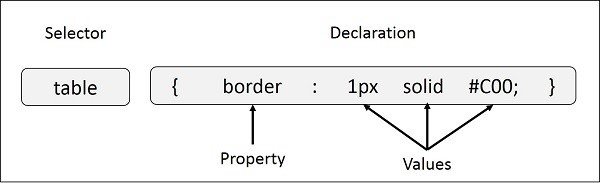

Figure 4
last Word
In this article, we tried to provide an overview of JavaFX and its capabilities. This robust framework can be used to build a variety of Java-based applications. JavaFX enables developers to create Java applications with modern user interfaces that leverage hardware acceleration.
Applications that are equipped with the portability index feature. If you are a Java developer, we suggest you not miss out on this great framework.
FAQ
What platforms does JavaFX support?
JavaFX works across desktop (Windows, macOS, Linux), mobile and embedded systems — enabling apps to run on many device types.
What kind of applications can be built with JavaFX?
You can build GUI applications, multimedia-rich content, web-embedded clients, animations, 3D graphics, and responsive user interfaces.
Why choose JavaFX over older Java UI toolkits?
Because JavaFX offers modern UI features: hardware-accelerated graphics, animation support, CSS-like styling, declarative UI via FXML, and more multimedia capabilities than older toolkits.