



To Secure Email Server: While Messengers and Social Networks Are Gaining Traction, Some Experts Believe The Use Of Email Has Changed; Emails Are Still The Main Communication Channel For Official Correspondence.
Secure Email Servers: For this reason, content stored on enterprise email servers is more critical than ever, and email server security should not be overlooked.
Email Server Security Challenges
Ensuring the security of email servers is one of the most important things organizations should pay attention to because emails are still one of the most widely used communication mechanisms that host essential information.
As a result, if business confidential data stored on these servers is exposed, businesses will suffer severe economic damage.
In addition, email servers must operate continuously so that users can access them at all times. If the servers fail for any reason, they can lose customer information and cause serious problems for the business.
To prevent server malfunctions, data loss, and other adverse events, you must secure and configure email servers to quickly identify and fix vulnerabilities.
Potential vulnerabilities
When we talk about security breaches, we mean that there is at least one unpatched vulnerability that hackers could exploit. Indeed, it is impossible to deal with all the vulnerabilities, but we can reduce their number.
To do this, we must follow security guidelines when configuring email servers to minimize the problems we will address.
In this article, we no longer intend to mention the need to install operating system security patches and applications, as we have discussed them in detail in previous issues of Network Monthly.
Unauthorized access
One of the most common attacks on email servers involves hackers circumventing authentication mechanisms to access users’ data. The first step to address this issue is to adopt strict password policies for server access.
This prevents passwords from being detected under the influence of pervasive search attacks, which is a common way to bypass the authentication mechanism. SMTP-based authentication is another way to protect servers from password-hacking attacks.
Challenges related to data leakage
One of hackers’ most important goals is to gain access to users’ personal information. When an email is sent over the Internet, it passes through various paths and hops, most of which are not secure.
It is technically possible to interpret passwords, usernames, and even messages’ content. To prevent such problems, incoming and outgoing emails should be encrypted. The IMAP, POP3, and SMTP protocols must also be encrypted using SSL / TLS certificates.
Spam
One common problem with emails, especially corporate emails, is spam. Spam Challenges are divided into two groups: sending spam to the user’s email client and sending spam to other clients based on the Open Reply technique.
To prevent the Open Relay problem, the server’s mail relay parameters must be configured correctly.
Content filtering mechanisms should be used to prevent these problems. These filters are installed on an email server or a proxy application to protect access to the server. This program can be a firewall, proxy server, or similar example.
Another solution is to use a blocklist of spam servers. For example, blocklists based on DNS NDSBL, SPAM URI RBL SURBL, or local instances that contain spammers’ IP addresses significantly prevent spam from reaching mailboxes on mail servers.
Mailbox problems
Email servers and clients are constantly exposed to malware threats. When an email server becomes infected with malware, not only is the system’s stability compromised, but the clients that use it are also under serious threat.
Other problems posed by malware include the loss of data comprehensiveness and privacy, and the spread of malware through email clients. To solve this problem, you need to use protection mechanisms against malware, such as an antivirus.
Service Denial of Service (DoS)

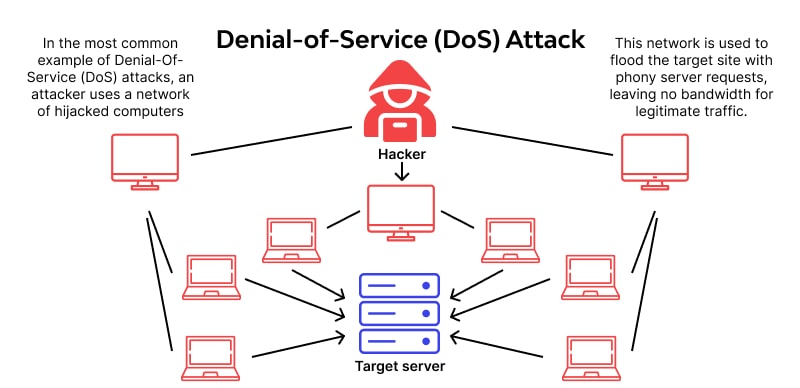
Service-depriving attacks on corporate email servers are entirely destructive and prevent clients from sending or receiving emails. The above problem seriously damages an organization’s reputation.
To prevent this problem, you should minimize the number of connections to the SMTP server, limit the number of connections at specified intervals, and limit the number of simultaneous connections.
Server stability and performance
When discussing maintaining server performance, we must consider implementing a load-balancing mechanism to handle server attacks or malfunctions. Most organizations use a backup server in this case.
The above process is performed for email servers using two MX records per domain. Email servers offer SMTP authentication options.
If the above option is enabled, you must have a username and a Password to email the server. Enabling this option is essential because it protects the server against sending out repeated requests.
In this case, uninterrupted server performance is guaranteed. Mail Relay is another essential option that needs to be set up and configured correctly.
The above option lets you specify which IP addresses the server can send an email to. This prevents many messages from being sent that could destabilize the server. Another powerful solution for maintaining server performance is the Reverse DNS mechanism.
The above filter can compare IP addresses with hostnames and domains. Based on this strategy, the server can be used again to send emails.
Preparation of required documents
The first step is to figure out what, why, and how it should be addressed. These three vital questions should be answered carefully during the review and audit process, focusing only on the most critical details.
- What: Make a list of all the data, including usernames, contact lists, attachments, and other items that you think are needed to track vulnerabilities. The list can be divided into several different checklists. It is best to prioritize each item on the list to make it easier to identify more serious problems.
- How: Using the list of components you have prepared, identify the tools and applications you can monitor and review. Next, you need to specify a way to check and control each element of this list. Expand the list of potential vulnerabilities using the provided list, and include controls to investigate their presence.
- Why: To identify the most essential items, specify each control operation’s rationale, priority, and scope of coverage. At this point, you need to remove duplicates from the list.
When preparing the checklist, you can use NIST SP 800-45 checklists. After preparing the list, specify the scope of work and the necessary resources. Once you have prepared a report on the current state of server security, you should first evaluate the highest-priority issues and examine their root causes.
Analyze identified problems
The risks should be evaluated during the analysis using the following equation.
Impact × Probability Exposure to risk
(Impact × Likelihood × Exposure)
Give each of the above points between 1 and 5. The number 5 indicates that a simple problem cannot be bypassed, and the number one means that the item on the list is not a serious security challenge.
The explanation of each of the parameters listed in the above equation is as follows:
- Impact: The impact of an accident or problem depends on the components at risk. In some cases, this effect may be weak (for example, server performance is disrupted for 100 milliseconds), and sometimes it may be strong (loss of database information). If the checklists are prepared correctly, it is possible to identify better the effects based on them.
- Probability refers to how reproducible the problem is and how simple it is to repeat—a clear example is filling the server memory with UDP packets through an open TCP port.
- Risk: The above parameter indicates how difficult it is to diagnose the problem during regular server operation. Being at risk can range from impossible (several unlikely problems) to unavoidable (using words like Password, Password management account’s Password—password failure due to receiving more than 1000 emails simultaneously).
After evaluation, all identified problems are sorted by risk level using the formula (impact × probability). In the next step, any event with a risk level higher than the specified value should be investigated.
This assessment helps to identify events (vulnerabilities, such as cyber threats, such as data loss), defects (loss of loyal customers due to spam)—and less essential problems, so that vulnerabilities and shortcomings can be prioritized to address them.
Repair vulnerabilities
Typically, there are three solutions to the so-called vulnerabilities:
- Use a newer version of the software, or replace it with another safe alternative.
- Install third-party software that can fix the problem.
- Disable problematic features.
The important things to look out for are the level of risk, the budget involved, and the resources needed to make the terms. Each factor significantly impacts the timing of remedial action and prioritization. So it’s best to fix simpler problems first rather than postpone them.
Typically, repairing complex vulnerabilities takes several days, so it’s best not to sacrifice minor but dangerous problems for complex vulnerabilities. It is recommended to group vulnerabilities that can be fixed with a simple modification. This will save you money in the long run.
A Case Study of Cyber Security
- MS Exchange Server
Exchange Server is one of Microsoft’s most widely used email servers. It is only installed on Windows Server. In addition to standard protocols such as SMTP, POP3, and IMAP, the software can support specific protocols such as EAS and MAPI.
This section will examine Exchange Server from a security perspective to provide an overview of security measures for managing and identifying vulnerabilities in the email service. The most critical components of the Exchange Server are:
- Edge Transport Server: This component monitors email sending and receiving. The above component works best when an organization’s communication infrastructure is divided into a protected internal network, an unprotected environment, and a civilian area (DMZ).
The above component is typically launched in the civilian area. The private mailbox on the Edge Transport Server provides additional protection for messages, reducing the server’s exposure to external attacks. Edge Transport is an optional component that can be installed or omitted during Exchange Server installation. - Database Availability Group: A component that provides high availability and data retrieval on the server. DAG is one of the main components of MailboxMailboxing mailbox availability and data retrieval after various events.
- Spam Protection: The spam protection component integrates more effectively with internal anti-spam tools installed in the communication network. It can be enabled directly on the Mailbox server.
- Malware protection: The above component is available to network administrators through the Malware agent on the Mailbox server. This feature is enabled by default in Exchange 2016.
- Outlook Web Access: A web-based email that allows all the features needed to manage emails, without installing the desktop email fully.
- In addition to these key components, Exchange Server uses some of the proprietary services and protocols as follows:
- Exchange ActiveSync: A protocol for synchronizing email templates across devices.
- Exchange Web Services: A set of multi-platform application programming interfaces that provide client applications access to emails, calendars, and other information.
- RPC over HTTP, MAPI over HTTP: These proprietary protocols allow email communication with the Exchange Server.
The Exchange Server plays a key role in management; emails should be appropriately configured and evaluated for security settings and anti-malware, as malware infections affect the server and the clients who use it.
In this step, we intend to review the testing and evaluation process for a concept server in accordance with the policies outlined at the beginning of the article.
Software test
Exchange Server security testing is best done based on organizational considerations and current environment infrastructure settings. Typically, an organization’s communication infrastructure may be based on the following scenarios:
- Scenario 1: The company has an internal network with Internet access. It has an MS Exchange Server with basic settings, and no Edge Transport Server is installed.
- Scenario 2: The company has an internal organizational network within the civilian area and accesses the Internet through it. The two Exchange servers, together with the accessibility group of the reproducible database and the Edge Transport Server installed in the civilian area, form the communication structure of this organizational network.
- As shown in Scenario 1, the network is vulnerable to cyberattacks. However, some companies use the above architecture due to cost savings. Before starting the test, the infrastructure should be configured according to the application for which it is defined, and the test should be performed to identify hazards.
Personal data leakage protection test
The above test interprets the connections between the Exchange Server and themailiemailsls. The above operation should be performed based on the following checklist:
- EAS, MAPI, IMAP, and emails are configured in thematic
- The mail must be installed and tested on OWA (web, mobile, and desktop) and in Atloc and Thunderbird.
- Hardware configuration is performed to simulate a man-in-the-middle (MITM) attack between the server and client, and then Wireshark, tcpdump, and Fiddler are used to analyze the data.
- Data is transferred between client and server via IMAP, MAPI, EA, S, or SMTP protocols.
- A middleman attack interprets network packets and attempts to identify unencrypted data.
Spam protection test
An example Exchange Server protection test against spam is based on the following scenario:
- Setting up several local email accounts to spam the tested Exchange Server is best.
- . Send spam to the Exchange Server and use the available scripts to create spam.
- Once spam is sent, the targeted inboxes should be checked to see if it has been delivered.
It is best to perform this test when anti-spam filters on the Mailbox and Edge Transport Server are enabled and disabled. This helps to evaluate the effectiveness of anti-spam mechanisms.
Test for protection against malware-infected emails
It would be best to have several malware-infected attachments to test protection for emails with malicious attachments. The Standard Anti-Virus File is Antivirus, forming the first test using an EICAR file called EICAR. This file is not originally malware and does not contain any malware.
However, most antivirus software detects viruses as malicious files. For this test, it is best to use files created for a specific purpose. For example, unique dynamic library (DLL) files that do not contain malicious code can be used. Still, the antivirus software classifies them as antivirus and then performs the test based on the following steps:
- Disable Malware Protection on Exchange Server.
- Send several malware-info emails to different clients.
- On recipient clients, search for emails containing malware.
- Repeat the same scenario for the server with the Protection Agent enabled. In addition, repeat the test to verify that this factor is enabled on the Edge Transport Server.
- Now, compare the results.
User password test
To test the reliability of users’ passwords, we can use Hydra, which is in the Kali Linux distribution. The software above allows us to identify weak passwords using the pervasive search attack vector. This test performs the attack through SMTP, IMAP, and POP3 protocols.
Test for protection against deprivation of service
To test for protection against deprivation of service attacks, you should simulate traffic to test the stability of Exchange Server services in the event of such attacks.
In addition, it is better to simulate various network failures. You can use software such as WAN for this purpose. In the above test, check which Exchange Server is more resistant to attacks and how fast the recovery process occurs when an attack occurs.
When performing the test, consider the above accessibility and check if the Exchange Server’s database accessibility component is enabled. In addition, is another server intended for backup?
Results
Once you have done these tests, you should classify the results in Table 1 to facilitate the vulnerability repair process.
last word
This article examines email server security and outlines key considerations for security testing. We also provide an overview of attacks on email servers, briefly analyze them, and show you how to identify and repair vulnerabilities.
Finally, we examined the security status of Exchange Server, a popular Windows-based server, as a case study.
Finally, it should be noted that the purpose of preparing the above article was to show that server security should be considered in the early stages of installing a server, as planning to address potential threats prevents severe damage to the reputation. Enter the organization.
FAQ
What authentication measures improve email security?
Use strong passwords, enable multi-factor authentication (MFA), and restrict login attempts to prevent unauthorized access.
Why enable encryption for email traffic and storage?
Encryption (TLS for transport, PGP/S/MIME for content) ensures emails cannot be read if intercepted or accessed without authorization.
What else helps harden email servers?
Keep server software up to date, disable unnecessary services, and implement spam/virus filtering and logging to detect suspicious activity.